Build dynamic pricing tools with vanilla JavaScript and Gutenberg blocks
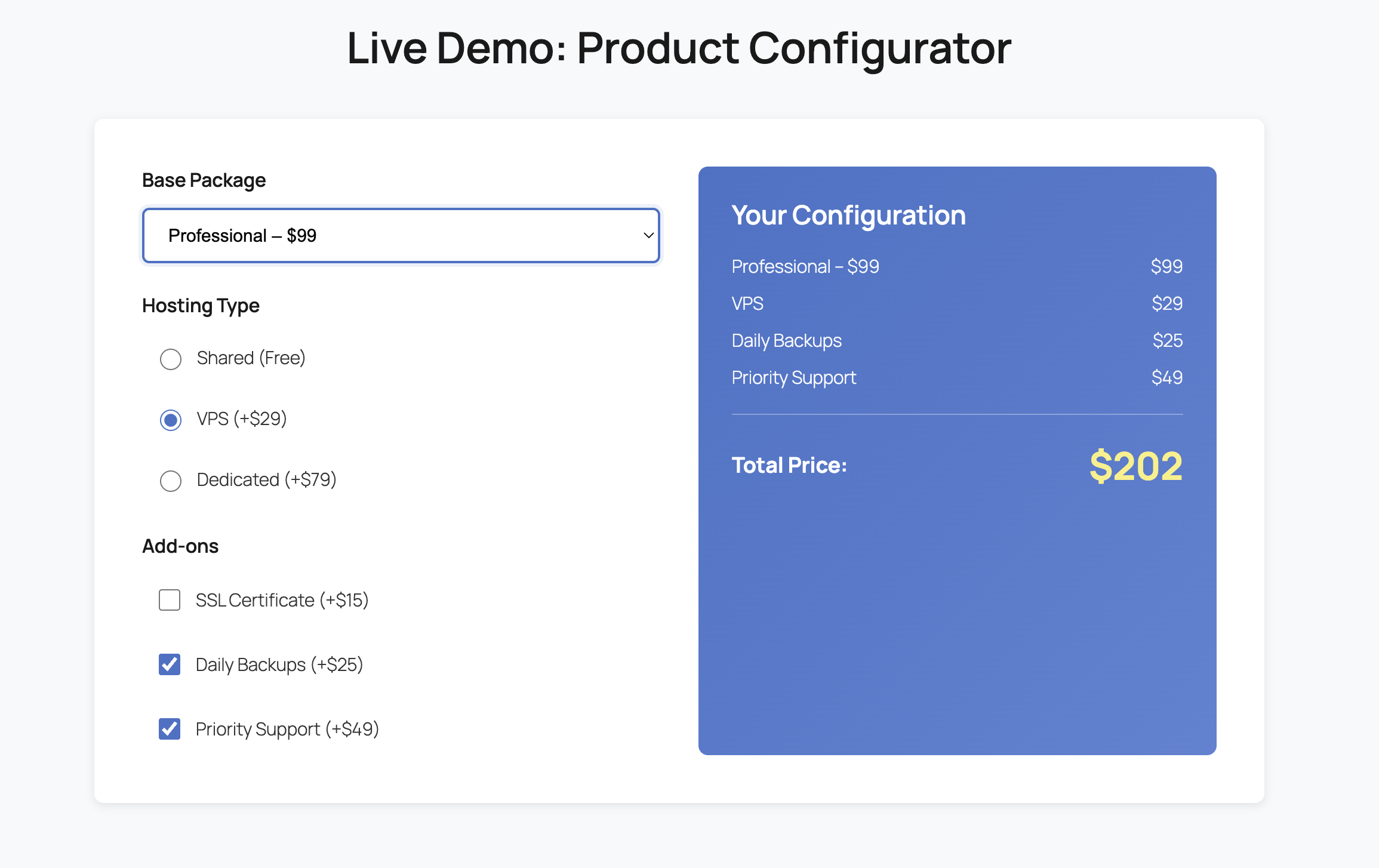
Live Demo: Product Configurator
Your Configuration
Total Price:$49
Modeling Options in JavaScript
The configurator uses data attributes to store pricing information directly in HTML elements. Each option carries its price value, making the system flexible and easy to maintain without hardcoding values in JavaScript.
Select elements handle mutually exclusive choices (base packages), radio buttons manage grouped options (hosting types), and checkboxes allow multiple add-ons. This structure mirrors real-world product configuration scenarios.
Calculation Logic & DOM Updates
Event listeners on input elements trigger recalculation whenever users interact with the configurator. The script queries all selected options, extracts their data-price attributes, and sums them to generate the total.
The summary section updates in real-time, displaying selected items with their individual prices. DOM manipulation is minimal and targeted, updating only the summary container and total price element for optimal performance.
Formatting & Accessibility
Currency formatting uses JavaScript’s toLocaleString() method to ensure proper dollar sign placement and comma separators. All form elements include proper label associations and semantic HTML for screen reader compatibility.
Focus states are clearly visible, keyboard navigation works seamlessly, and ARIA attributes could be added for enhanced accessibility. The configurator maintains WCAG contrast ratios throughout.
How AI Builder Generates This
AI Builder automatically generates the complete Gutenberg block structure, including the HTML block containing the configurator markup. It creates semantic, accessible HTML with proper data attributes for each pricing option.
The AI produces custom CSS that styles the configurator with modern design patterns, responsive layouts, and smooth transitions. It ensures visual consistency with your site’s color scheme and typography.
Finally, AI Builder generates the vanilla JavaScript that powers the configurator: event listeners, calculation logic, DOM updates, and formatting functions. All code is production-ready and optimized for performance.
Reproduce This Feature
Use this exact prompt with AI Builder to generate your own product configurator:
Create a WordPress page presenting a "Mini Product Configurator": radio/select/checkbox options that update a total price and a live summary (e.g., "Base + Option A + Priority support"). Implement in vanilla JS inside an HTML block (data-driven options, calculation, DOM updates).
Copied!
Start Building with AI Builder
Generate complete WordPress pages with custom functionality in seconds. No coding required.
Watch your profile completion percentage grow as you fill in the form fields below. A real-time progress bar and smart weighting system guide you to 100%.
What is a Completion Score?
A completion score is a dynamic percentage that reflects how much of a user profile or form has been filled out. It combines a visual progress bar with real-time feedback, encouraging users to complete all fields and improve data quality.
This demo showcases a weighted scoring system where critical fields (email, phone) contribute more to the total score than optional ones. The progress bar animates smoothly, providing instant visual gratification.
Live Demo: Complete Your Profile
0%
Profile Completion
Essential Information
Profile Details
Optional
UX Rationale & Design Decisions
Weighted Scoring System
Not all fields are equal. Email and phone (20% each) are weighted higher because they’re critical for communication. Profile details like name and bio (15% each) come next, while optional fields (company, website, location at 10% each) round out the score. This weighting reflects real-world importance and guides users to prioritize essential information.
Accessibility Considerations
All form inputs have associated labels for screen readers. The progress bar includes ARIA attributes (role, aria-valuenow, aria-valuemin, aria-valuemax) to announce completion percentage. Focus states are clearly visible, and color contrast meets WCAG AA standards. Keyboard navigation works seamlessly through all interactive elements.
Performance & Smooth Animation
The progress bar uses CSS transitions for smooth width changes, avoiding janky JavaScript animations. Event listeners are attached once on page load, and the scoring calculation runs in O(n) time. Debouncing isn’t needed here since checkbox/input changes are discrete user actions, not rapid-fire events like scrolling.
How AI Builder Generates This Feature
AI Builder transforms a simple text prompt into a complete WordPress page with Gutenberg blocks, custom CSS, and vanilla JavaScript. Here’s how it works for this completion score feature:
Gutenberg Blocks: AI Builder creates a JSON structure with core/cover for the hero, core/group containers for sections, and a core/html block containing the form markup and widget structure.
Custom CSS: The AI generates scoped styles for the completion widget, progress bar animations, form fields, and responsive breakpoints—all without conflicting with existing site styles.
Vanilla JavaScript: AI Builder writes the complete logic for input listeners, weighted scoring calculation, progress bar updates, and ARIA attribute management—no libraries required.
Instant Deployment: The generated code is production-ready and works immediately in WordPress, with no manual editing or debugging needed.
This approach lets you prototype complex interactive features in seconds, then customize the generated code to match your exact requirements.
Reproduce This Feature
Want to generate this exact completion score feature in your own WordPress site? Copy the prompt below and paste it into AI Builder:
Create a block demonstrating a "Completion Score" feature: a checklist + form inputs (email, phone, bio, etc.) and a percentage meter that updates as fields are completed, with a smooth animated progress bar. Implement the full logic in vanilla JS inside an HTML block (input listeners, weighted scoring, rendering).
Copied!
Ready to Build Interactive Features?
AI Builder empowers you to create complex, interactive WordPress pages with custom logic in seconds. No coding expertise required—just describe what you want, and watch it come to life.
Learn how to build a dynamic comparison table with column highlighting using vanilla JavaScript and Gutenberg blocks.
Live Demo: Interactive Comparison Table
Basic
$9/mo
5 Projects
10GB Storage
Email Support
Basic Analytics
Pro
$29/mo
Unlimited Projects
100GB Storage
Priority Support
Advanced Analytics
Custom Domain
Enterprise
$99/mo
Unlimited Everything
1TB Storage
24/7 Phone Support
White Label
API Access
Dedicated Manager
Understanding the HTML Structure
The comparison table uses a semantic structure with data attributes for JavaScript targeting. Each column is wrapped in a div with a data-plan attribute, making it easy to identify and manipulate specific pricing tiers.
The key structural elements include a wrapper div for the entire table, individual column containers, header sections with pricing, feature lists and action buttons. This modular approach ensures maintainability and scalability.
CSS Approach and Styling Strategy
The CSS uses a mobile-first approach with flexbox for responsive column layouts. Hover states are managed through the .column-hover class, which applies a subtle transform and shadow effect to create visual feedback.
The .best-choice-active class provides a persistent highlight with a distinctive border and background color. CSS transitions ensure smooth state changes, while custom properties enable easy theme customization. The design prioritizes clarity and visual hierarchy.
Accessibility Considerations
Keyboard navigation support with focus-visible states for all interactive elements
ARIA labels on checkboxes to announce state changes to screen readers
Sufficient color contrast ratios meeting WCAG AA standards
Semantic HTML structure with proper heading hierarchy
Visual feedback that doesn’t rely solely on color
Common Pitfalls to Avoid
Avoid using inline styles for state management as they override CSS classes and make debugging difficult. Don’t forget to remove event listeners if dynamically adding/removing columns to prevent memory leaks.
How AI Builder Can Generate This in WordPress
AI Builder automatically generates the complete Gutenberg block structure, including the HTML block with the comparison table markup. It creates responsive CSS with hover states, transitions, and mobile-first breakpoints tailored to your brand colors.
The plugin injects vanilla JavaScript for state management, handling column highlighting on hover. Everything is production-ready with accessibility features, semantic HTML, and clean code architecture—no manual coding required.
Prompt to Reproduce This Feature
Create a block showcasing a “Comparison Table” interaction: hovering a column highlights the entire column. Implement in vanilla JS inside an HTML block (class toggling, state handling). In the post, explain the HTML structure, recommended CSS approach, accessibility considerations, and pitfalls.
Copied!
Ready to Build Interactive WordPress Pages?
Let AI Builder generate complete pages with custom interactions, styling, and JavaScript—all optimized for WordPress and ready to publish.
Ready-to-use prompts for creating stunning stats blocks with AI Builder. Each example includes a working component and the exact prompt to recreate it.
Interactive Stats Components
Below you’ll find four professional stats block examples. Each component is fully functional and comes with a copy-ready prompt that you can use directly in AI Builder to recreate the exact same design and functionality on your WordPress site.
Example 1: Animated Counter Stats
A clean stats block with animated counters that increment from zero to the target value. Perfect for showcasing key metrics and achievements.
0
Active Users
0
Satisfaction Rate
0
Projects Completed
0
Support Hours
Copy This Prompt
Create a stats block with 4 columns showing: 2500 Active Users, 98% Satisfaction Rate, 150 Projects Completed, and 24/7 Support Hours. Add animated counters that count up from 0 when the section becomes visible. Use a clean, modern design with large numbers and subtle labels below each stat.
Example 2: Progress Bar Stats
Stats displayed with animated progress bars that fill to their target percentage. Ideal for showing completion rates, skill levels, or performance metrics.
Customer Retention0%
Project Success Rate0%
Team Productivity0%
Client Satisfaction0%
Copy This Prompt
Create a stats block with animated progress bars showing: Customer Retention 94%, Project Success Rate 89%, Team Productivity 96%, and Client Satisfaction 92%. Each bar should animate from 0% to its target value when scrolled into view. Use a horizontal bar design with the label on the left and percentage on the right.
Example 3: Icon-Based Stats Grid
A visually rich stats grid with icons, animated numbers, and descriptive text. Perfect for feature highlights or service statistics with visual appeal.
🚀
0
Launches This Year
⭐
0
Average Rating
👥
0
Community Members
🏆
0
Awards Won
Copy This Prompt
Create an icon-based stats grid with 4 items: 500+ Launches This Year (rocket icon), 4.9 Average Rating (star icon), 10,000+ Community Members (people icon), and 25 Awards Won (trophy icon). Each stat should have an icon in a colored circle, an animated counter, and descriptive text below. Use a card-style layout with subtle shadows.
Example 4: Dynamic Statistics Block
Visualize your data with interactive line charts. Track multiple metrics over time with smooth animations and responsive design.
Create a statistics block with a line chart showing two data series: ‘Revenue’ (blue line) with values [45, 52, 48, 65, 72, 68, 85] and ‘Users’ (yellow line) with values [30, 38, 42, 55, 61, 58, 70] across 7 months (Jan-Jul). Include smooth animations, responsive design, grid lines, and a legend.
Install AI Builder and use these prompts to create professional stats blocks in seconds. No coding required—just copy, paste, and customize to match your brand.
Hover or tap technical terms to see instant definitions. Click for detailed explanations in a side panel.
What is an Interactive Glossary?
An interactive glossary enhances user experience by providing contextual definitions without disrupting reading flow. When users encounter unfamiliar terms, they can hover for a quick tooltip or click for comprehensive details in a side panel.
Live Demo: Try the Glossary
Modern web development relies heavily on APIs to connect different services. When building a SPA, developers often use REST or GraphQL to fetch data. Understanding CORS is essential for secure cross-origin requests.
Performance optimization involves techniques like lazy loading, caching, and CDN usage. Modern frameworks implement SSR for better SEO and initial load times.
Implementation Strategy
Markup with Data Attributes
Each glossary term uses a data-term attribute to link to its definition in the JSON object. The aria-describedby attribute connects terms to their tooltips for screen readers, ensuring accessibility compliance.
Tooltip Behavior: Desktop vs Mobile
On desktop, tooltips appear on hover with a 300ms delay to prevent accidental triggers. On mobile, tap shows the tooltip briefly before opening the full panel. Touch events are detected to optimize the experience for each device type.
Accessibility Features
ARIA roles and labels for screen reader support
Keyboard navigation with Escape key to close panel
Focus management when panel opens and closes
High contrast colors meeting WCAG standards
Performance Optimization
The glossary uses event delegation on the container rather than individual listeners on each term. Definitions are stored in a single JSON object for instant lookup. CSS transforms handle animations for smooth 60fps performance.
How AI Builder Can Generate This
AI Builder transforms your description into a complete WordPress page with Gutenberg blocks, custom CSS, and functional JavaScript. Simply describe your interactive glossary feature, and AI Builder generates the JSON block structure, styles the tooltips and panel, and creates the vanilla JS logic for term detection and interaction.
The AI handles responsive design, accessibility attributes, and performance optimization automatically. You get production-ready code that works immediately, with no manual coding required.
Prompt to Reproduce This Feature
Use this exact prompt with AI Builder to create your own interactive glossary page:
Create an "Interactive Glossary": certain terms in the content show a tooltip on hover/tap, and clicking a term opens a side panel with the full definition. The glossary should be driven by a JSON object inside the JavaScript. Implement it in vanilla JS inside an HTML block.
Build, save, and reuse UTM campaign links instantly. A mini SaaS prototype powered by vanilla JavaScript.
What Are UTM Parameters?
UTM parameters are tags you add to URLs to track the effectiveness of marketing campaigns in analytics tools like Google Analytics. They help you identify which sources, mediums, and campaigns drive the most traffic and conversions.
The five standard UTM parameters are: utm_source (traffic source), utm_medium (marketing medium), utm_campaign (campaign name), utm_content (ad variation), and utm_term (paid keywords).
Interactive Demo
Try the UTM builder below. Enter your URL and campaign details, then save templates for quick reuse.
Generated URL
Enter details above to generate URL
Why Templates Speed Up Growth Experiments
Growth marketers run dozens of experiments weekly. Manually building UTM links for each campaign is tedious and error-prone. Reusable templates eliminate repetitive work and ensure consistency across campaigns.
With saved templates, you can instantly generate links for recurring campaigns like newsletters, social posts, or paid ads. This speeds up execution and reduces mistakes in tracking parameters.
How the JavaScript Works
The demo uses vanilla JavaScript with no external libraries. It listens to input changes, validates the base URL format, and builds the final URL by appending UTM parameters using encodeURIComponent() to handle special characters safely.
Templates are stored in localStorage as JSON objects. When you save a template, the app serializes the current form state and stores it with a unique name. Loading a template retrieves the data and populates the form fields instantly.
The copy-to-clipboard feature uses the modern navigator.clipboard.writeText() API with fallback handling. Success and error messages appear as toast notifications with auto-dismiss timers.
Accessibility Considerations
All form inputs have proper labels for screen readers. The copy button is disabled until a valid URL is generated. Toast messages use ARIA live regions to announce status changes to assistive technologies.
How AI Builder Can Generate This in WordPress
AI Builder is a WordPress plugin that generates complete pages from simple descriptions. Instead of manually coding Gutenberg blocks, CSS, and JavaScript, you describe what you need and the AI creates production-ready code instantly.
For this UTM builder prototype, AI Builder would generate the Gutenberg JSON structure, custom CSS for styling the form and preview area, and vanilla JavaScript for URL building, validation, localStorage management, and clipboard operations—all in seconds.
This approach is perfect for rapid prototyping. You can test ideas, gather feedback, and iterate quickly without writing boilerplate code. AI Builder handles the technical implementation while you focus on product strategy.
Prompt to Reproduce This Feature
Want to recreate this UTM builder in your own WordPress site? Copy the prompt below and use it with AI Builder:
Create a mini SaaS prototype: "UTM Link Builder with reusable templates." The page must include a working interactive demo built with vanilla JavaScript inside a single HTML block (no external libraries).

Requirements: inputs for base URL + utm_source + utm_medium + utm_campaign + optional utm_content/utm_term; live preview of the final URL; validation for URL; a "Copy link" button; a "Save template" button that saves current UTM fields to localStorage; a "Templates" dropdown to load/delete saved templates; small success/error toasts.
Ready to Build Faster?
AI Builder helps you prototype WordPress features in minutes, not hours. Generate complete pages with custom functionality using simple descriptions.
Press Ctrl+K (or Cmd+K on Mac) to activate instant search within this page. Navigate results with keyboard shortcuts and see live highlighting.
How It Works
This in-page search feature demonstrates advanced JavaScript techniques for creating a seamless user experience. When you press Ctrl+K, a search interface appears that indexes all text content on the page, highlights matching terms, and provides keyboard navigation between results.
Technical Implementation
1. Text Indexing Strategy
The search system indexes all text nodes within the main content area. It traverses the DOM tree recursively, collecting text from paragraphs, headings, and list items while preserving their original structure. This approach ensures accurate search results without modifying the underlying HTML structure.
2. DOM-Safe Highlighting
Highlighting matches requires careful DOM manipulation. The system wraps matched text in span elements with specific classes, ensuring that existing HTML structure remains intact. Before applying new highlights, all previous highlight spans are removed to prevent nested highlighting issues. This technique maintains accessibility and prevents breaking interactive elements.
3. Focus Management
Proper focus management ensures keyboard accessibility. When the search bar opens, focus moves to the input field. Pressing Escape returns focus to the previously focused element. The current match is scrolled into view smoothly, and visual indicators show which result is active. This creates an intuitive navigation experience.
4. Accessibility Features
The search interface includes ARIA labels, keyboard shortcuts, and screen reader announcements. The search input has appropriate role attributes, and the result counter provides live feedback. All interactive elements are keyboard accessible, and focus indicators are clearly visible. These features ensure the search works for all users.
How AI Builder Generates This Feature
AI Builder analyzes your feature request and generates complete WordPress implementations including Gutenberg blocks, custom CSS styling, and functional JavaScript code. For this in-page search feature, AI Builder created the entire search interface, keyboard event handlers, text indexing logic, and highlighting system in a single generation.
The plugin understands complex interactions like DOM traversal, event delegation, and accessibility requirements. It produces production-ready code that follows WordPress best practices and modern JavaScript standards. You can further customize the generated code through the WordPress editor or by modifying the CSS and JavaScript directly.
Prompt to Reproduce This Feature
Use this exact prompt with AI Builder to generate this in-page search feature:
Create this feature: pressing Ctrl+K opens a compact search bar, highlights matches within the post content, and allows Next/Previous navigation between results. Implement everything in vanilla JavaScript inside an HTML block.
Press Ctrl+K (or Cmd+K on Mac) anywhere on this page to activate the search. Type any word to see instant highlighting and use arrow keys to navigate between matches.
Automatically track article length and estimated reading time with vanilla JavaScript and MutationObserver
54 words • 1 min read
Understanding the Live Word Count Feature
This feature automatically calculates and displays the word count and estimated reading time for your blog posts. It updates in real-time as content changes, providing readers with immediate feedback about article length.
How Word Counting Works
The word counting algorithm extracts all text content from the article, removes extra whitespace, and splits the text by spaces. It filters out empty strings to ensure accurate counting. This approach handles various text formats including paragraphs, lists, and headings.
Reading Time Estimation
Reading time is calculated using an average reading speed of 200 words per minute (WPM). This is a standard metric used across the web. The calculation divides total words by WPM and rounds up to ensure readers have a realistic time estimate. Even short articles show at least 1 minute.
MutationObserver for Real-Time Updates
The MutationObserver API monitors DOM changes within the article container. When content is added, removed, or modified, the observer triggers a recalculation. This ensures the word count and reading time stay synchronized with the actual content without manual refreshes.
The observer configuration watches for childList changes (added/removed nodes), subtree modifications (nested changes), and characterData updates (text edits). This comprehensive monitoring captures all content variations while maintaining performance.
Edge Cases and Considerations
Empty content: Returns 0 words and 0 minutes when no text exists
Special characters: Punctuation and symbols are handled naturally by space-based splitting
Multiple spaces: Extra whitespace is normalized before counting
Hidden elements: All text nodes are counted regardless of CSS visibility
For optimal performance, the script runs calculations only when necessary. The MutationObserver is scoped to the article container rather than the entire document. Text extraction uses native DOM methods which are highly optimized by browsers.
Consider debouncing the update function if you expect rapid content changes. For very long articles (10,000+ words), the performance impact remains negligible. The observer can be disconnected when not needed to free resources.
How AI Builder Can Generate This in WordPress
AI Builder automatically generates the complete Gutenberg block structure for features like this. It creates properly formatted JSON blocks with all necessary attributes, ensuring compatibility with WordPress core blocks.
The plugin generates custom CSS that styles your blocks professionally while maintaining responsiveness. It follows modern CSS practices with custom properties, mobile-first design, and accessibility considerations built in.
AI Builder includes vanilla JavaScript functionality when needed, like this word counter. It writes clean, performant code without dependencies, ensuring fast page loads and compatibility. The AI handles complex features including DOM manipulation, event listeners, and API integrations.
Accessibility is automatically addressed with proper ARIA labels, focus states, and semantic HTML. The AI ensures WCAG compliance while maintaining visual appeal and functionality across all devices and assistive technologies.
Prompt to Reproduce This Feature
Use this exact prompt with AI Builder to recreate this feature:
Create this feature: display "X words • Y min read" and update automatically when the article text changes (use a MutationObserver). Include the complete vanilla JavaScript inside an HTML block (no dependencies).
Generating Dynamic Content Filters with AI Builder
A real-world case study on building interactive team sections without complex plugins
The Challenge: Displaying Large Teams Without Clutter
Modern agencies and businesses face a common dilemma: how do you showcase a team of 20, 50, or even 100 members without overwhelming visitors? Traditional approaches fall short. Endless scrolling creates fatigue, while pagination breaks the browsing experience. Users want instant access to relevant team members—designers, developers, strategists—without hunting through pages of content.
Portfolio sites encounter the same issue. When you’ve completed 200 projects across multiple industries, presenting them all at once creates visual chaos. Visitors need filtering capabilities to find work relevant to their sector, whether that’s healthcare, finance, or e-commerce. The challenge isn’t just technical—it’s about user experience and conversion optimization.
The Plugin Problem: Clunky Interfaces and Vendor Lock-In
Most WordPress developers turn to gallery or slider plugins for filtering functionality. These tools promise easy implementation but deliver frustrating limitations. Custom post types require configuration. Shortcodes clutter your content. Settings panels hide behind multiple tabs. What should take minutes stretches into hours of trial and error.
Performance suffers too. Heavy plugins load unnecessary JavaScript libraries, slowing page speed. Premium versions lock essential features behind paywalls. When you switch themes, layouts break. Updates introduce conflicts. You’re trapped in a cycle of dependency, paying annual fees for functionality that should be native to your site.
Design customization becomes another headache. Plugin templates rarely match your brand. CSS overrides pile up. Mobile responsiveness requires additional tweaking. The interface that looked simple in the demo becomes a maintenance nightmare in production.
The AI Builder Solution: One Prompt, Complete Implementation
AI Builder eliminates this complexity entirely. Instead of configuring plugins, you describe what you want in plain English. The AI generates complete Gutenberg blocks, custom CSS, and functional JavaScript—all optimized and ready to deploy. Here’s the exact prompt used for this case study:
“Create a Team section with 6 cards. Add a filter menu at the top with buttons: ‘All’, ‘Design’, ‘Dev’. Use JavaScript to instantly hide/show cards based on their category with a fade-in effect. Style cards with a modern hover lift effect and clean typography.”
Within seconds, AI Builder delivered a complete solution: six team member cards with department tags, a functional filter menu, smooth fade animations, and hover effects. No plugin installation. No configuration panels. No shortcodes. Just clean, semantic HTML wrapped in Gutenberg blocks, styled with custom CSS, and powered by vanilla JavaScript.
The Agency Advantage: Prototype to Production in Minutes
For agencies, AI Builder transforms client workflows. During discovery calls, you can generate live prototypes while discussing requirements. Client wants to see their team organized by department? Generate it. Need a portfolio filtered by industry? Done in 30 seconds. This speed converts prospects into clients by demonstrating capability in real-time.
Project timelines compress dramatically. Tasks that consumed hours—researching plugins, testing compatibility, writing custom code—now take minutes. Your team focuses on strategy and design rather than technical implementation. Junior developers can deliver senior-level functionality. Freelancers compete with larger agencies on feature complexity.
Budget flexibility improves too. Without premium plugin subscriptions, you control costs. Custom features don’t require developer hours. Clients get bespoke solutions at template prices. You can offer more revisions, experiment with different layouts, and iterate based on feedback—all without burning through project budgets.
Maintenance: Direct Editing in Gutenberg
Long-term maintenance becomes effortless. Because AI Builder generates native Gutenberg blocks, clients can update content themselves. Adding a new team member? Click the block, duplicate it, and edit the text. Changing someone’s role? Update the category tag directly in the editor. No backend panels. No custom fields. No support tickets.
The JavaScript filtering continues working regardless of content changes. Add 20 more team members? The filter adapts automatically. Rename a department? Update the button label and category tags—the logic persists. This resilience eliminates the fragility of plugin-dependent solutions where updates break functionality.
Version control becomes simpler too. The entire implementation lives in your page content—blocks, styles, and scripts. Export the page, and you’ve captured everything. Migrate to a new site? Copy and paste. No database dependencies. No plugin version conflicts. Just portable, self-contained functionality.
Total Creative Freedom Through AI
This case study demonstrates a fundamental shift in WordPress development. AI Builder doesn’t replace your creativity—it amplifies it. You describe the experience you want to create, and the AI handles the technical implementation. No more choosing between design vision and technical feasibility. No more compromising because a plugin doesn’t support your exact use case.
The filtering system we built is just one example. The same approach works for pricing tables, testimonial carousels, FAQ accordions, or any interactive component you can imagine. Each implementation is custom, lightweight, and maintainable. You own the code. You control the design. You deliver exactly what clients need.
The future of WordPress development isn’t about learning more frameworks or mastering complex APIs. It’s about clearly articulating what you want to build and letting AI handle the implementation details. AI Builder makes this future available today, transforming how agencies prototype, how developers build, and how clients maintain their sites.
Ready to Transform Your Workflow?
Experience the power of AI-driven WordPress development. Build interactive features in minutes, not hours.
Interactive FAQ Accordions: Clean Code, Better SEO, Zero Plugins
Discover how to build SEO-optimized FAQ sections with smooth animations and zero plugin bloat
Why FAQs Are Crucial for Google Rich Snippets
Frequently Asked Questions aren’t just helpful for users—they’re gold for search engines. When properly structured, FAQ sections can trigger Google’s Rich Snippets, displaying your answers directly in search results. This prime real estate increases click-through rates by up to 35% and positions your site as an authoritative source.
Google’s algorithm specifically looks for FAQ schema markup—a structured data format that tells search engines ‘this is a question, and here’s the answer.’ When implemented correctly, your FAQs can appear as expandable dropdowns in search results, giving users instant answers without even clicking through to your site. While that might sound counterintuitive, it actually builds trust and increases brand visibility.
The key is semantic HTML. Search engines can’t interpret fancy JavaScript animations or plugin-generated markup if it’s not built on a solid foundation. Using proper heading tags, list structures, and ARIA attributes ensures both accessibility and SEO performance.
Static Blocks vs. Interactive Accordions: The Limitations
Traditional WordPress FAQ implementations fall into two camps: static text blocks or bloated plugins. Static blocks display all questions and answers at once, creating overwhelming walls of text that users must scroll through endlessly. This approach tanks user experience and increases bounce rates, especially on mobile devices where screen real estate is precious.
Plugins like Ultimate Blocks or Accordion Blocks solve the interaction problem but introduce new issues. They inject thousands of lines of CSS and JavaScript into every page load—even pages that don’t use accordions. This bloat slows down your entire site, hurting Core Web Vitals scores that Google uses for ranking. You’re trading user experience for… slightly better user experience.
Interactive accordions offer the best of both worlds: clean presentation with all content available to search engines. When a user clicks a question, the answer smoothly expands while others collapse. This progressive disclosure pattern reduces cognitive load and keeps users engaged. The trick is implementing this without the plugin overhead.
The Implementation: AI-Generated FAQ Accordion
Instead of installing yet another plugin, you can generate a custom FAQ accordion using AI Builder. Simply provide this prompt to the AI:
“Create a 5-question FAQ that opens/closes like an accordion.
– Use one main container: .aib-faq – Make each question clickable with a button.
– Each answer must be hidden by default, then shown when its question is clicked.
– When a question opens, automatically close the others.
– Add a smooth open/close animation. – Include a +/− icon that changes when the item is open.
– Ensure it stays responsive on mobile.”
The AI generates clean Gutenberg blocks with inline JavaScript that handles all interactions. Each question is wrapped in a button element for keyboard accessibility, and answers use proper ARIA attributes. The JavaScript is minimal—under 50 lines—and only loads on pages that actually use the accordion.
The animation uses CSS transitions rather than jQuery slideToggle, resulting in smoother 60fps performance. Icons rotate using CSS transforms, and the entire component is mobile-first responsive. Best of all, the HTML structure is semantic: each FAQ item is a definition list (dl/dt/dd) that search engines understand natively.
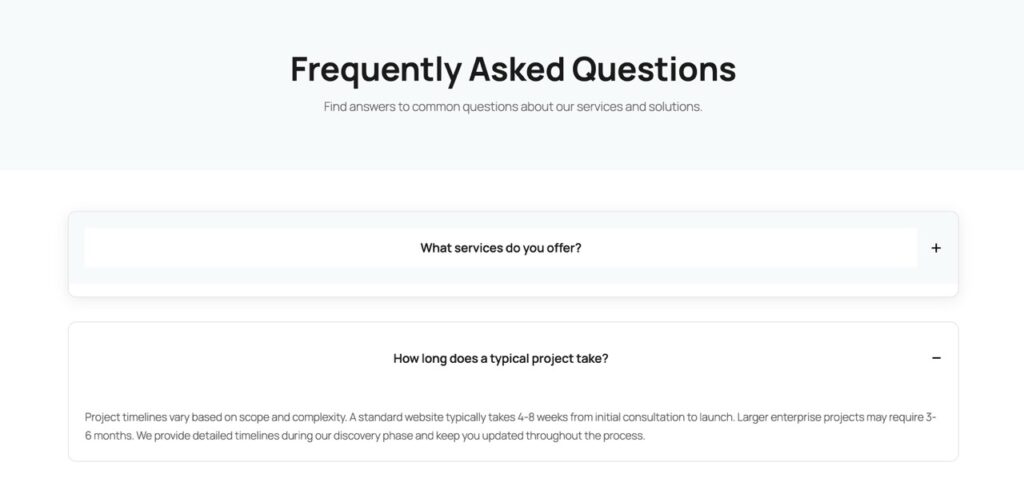
Visual Example
SEO Focus: AI-Generated JSON-LD Schema
Here’s where AI Builder truly shines: it doesn’t just create the visual accordion, it can also generate the corresponding JSON-LD schema markup. This structured data is what Google reads to create those coveted Rich Snippets in search results.
The AI extracts each question and answer from your accordion, then formats them into proper FAQPage schema. This JSON-LD code gets inserted into your page’s head section, invisible to users but crystal clear to search engines. Google’s structured data testing tool will validate it instantly, confirming your eligibility for Rich Snippets.
Manual schema generation is tedious and error-prone. Miss a comma or quotation mark, and the entire schema fails silently. AI Builder eliminates this risk by generating syntactically perfect JSON-LD every time. Update your FAQ content, regenerate the schema, and you’re done—no schema plugin required.
Replacing Ultimate Blocks: Reduce Your CSS Bundle Size
Ultimate Blocks is a popular Gutenberg extension that includes accordion functionality. However, it loads approximately 180KB of CSS and JavaScript on every page—whether you use accordions or not. For a single FAQ section, you’re forcing visitors to download styles for testimonials, countdowns, progress bars, and dozens of other blocks you’ll never use.
AI Builder’s approach is surgical: generate only the code you need, when you need it. A custom FAQ accordion adds roughly 3KB of CSS and 2KB of JavaScript—a 97% reduction in file size. This directly improves your Largest Contentful Paint (LCP) and Time to Interactive (TTI) metrics, both critical Core Web Vitals that affect search rankings.
Beyond performance, you gain complete control. Want to match your brand colors exactly? Adjust the CSS variables. Need different animation timing? Tweak the transition duration. With plugins, you’re locked into their design decisions and update cycles. With AI-generated code, you own every line and can modify it freely.
Conclusion: Clean Code, Better Results
Interactive FAQ accordions represent the intersection of user experience and technical SEO. They provide the progressive disclosure that modern users expect while maintaining the semantic HTML that search engines require. The traditional approach—installing a bloated plugin—solves one problem while creating others.
AI Builder offers a third way: custom-generated code that’s lean, performant, and perfectly tailored to your needs. Generate the accordion structure, the smooth animations, and even the JSON-LD schema—all without touching a plugin directory. Your site loads faster, ranks better, and gives you complete creative control.
The future of WordPress development isn’t about accumulating plugins—it’s about generating exactly what you need, when you need it. FAQ accordions are just the beginning. Every interactive element, every custom layout, every performance optimization can be AI-generated with clean, maintainable code. Zero plugins, maximum results.