
Ditch the Plugins: Create Native ‘Copy to Clipboard’ Components with AI
Learn how to build lightweight, native clipboard functionality without bloated plugins—powered by AI Builder and vanilla JavaScript.
Why ‘Copy to Clipboard’ is Essential
For affiliate marketers and developers, the ‘Copy to Clipboard’ feature isn’t just a nice-to-have—it’s a conversion driver. When users can instantly copy coupon codes, API keys, or command snippets with one click, friction disappears. Studies show that reducing steps in the user journey increases completion rates by up to 35%.
Traditional implementations require users to manually select text, right-click, and paste—a multi-step process that feels outdated in 2025. Modern web experiences demand instant gratification. A well-designed clipboard button provides immediate visual feedback, builds trust, and keeps users engaged with your content instead of wrestling with text selection.
Why ‘Copy Anything to Clipboard’ is Overkill
The WordPress plugin repository is flooded with clipboard solutions like ‘Copy Anything to Clipboard’ that promise easy implementation. But here’s the reality: these plugins load entire JavaScript libraries (often 20-50KB minified) just to execute a function that native browser APIs handle in 10 lines of code.
Every plugin adds HTTP requests, increases page load time, and introduces potential security vulnerabilities. For a feature as simple as copying text, you’re trading performance for convenience. The modern Clipboard API is supported in 97% of browsers—there’s no need for polyfills or third-party dependencies. Plus, maintaining plugin updates and compatibility with WordPress core becomes an ongoing burden.
The AI Builder Implementation
Instead of installing a plugin, use AI Builder to generate a custom component in seconds. Simply describe what you need, and the AI creates the HTML structure, CSS styling, and JavaScript functionality—all optimized and ready to deploy. Here’s the exact prompt that generates a professional coupon code block:
“Generate a Coupon Code block. On the left, display the code ‘AI-ROCKET-2025’. On the right, a button ‘Copy Code’. Use JavaScript so that when clicked, the code is copied to the clipboard, the button text changes to ‘Copied!’, and a small green success checkmark appears. Style it with a dashed border.”
That’s it. No coding required. AI Builder interprets your request and generates clean, semantic code that integrates seamlessly with WordPress Gutenberg blocks. The result is a lightweight component that loads instantly and works flawlessly across devices.
See It in Action
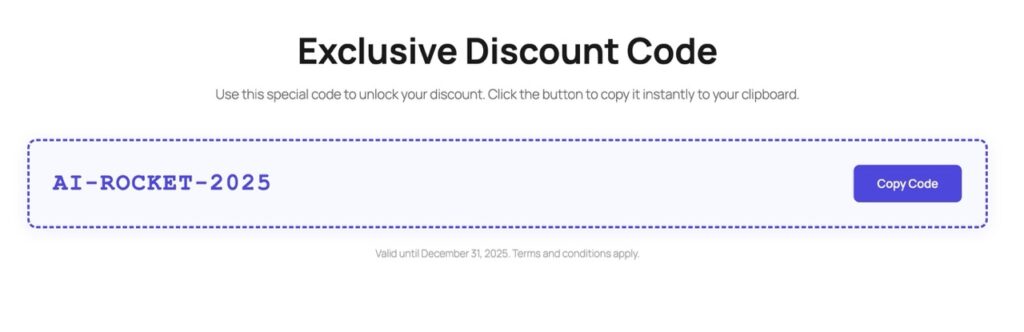
The generated component features a clean layout with the coupon code prominently displayed on the left and an action button on the right. The dashed border adds visual interest while maintaining professional aesthetics. When clicked, the button provides instant feedback—changing text and displaying a checkmark—so users know their action succeeded.
Performance Breakdown: Why Libraries Are a Mistake
Let’s compare the technical overhead. A typical clipboard plugin loads a JavaScript library (clipboard.js is 11KB gzipped), adds initialization code, and requires DOM manipulation. This creates three HTTP requests: the plugin file, the library, and potential CSS dependencies. Total load time: 200-400ms on a fast connection.
The native approach? Zero external requests. The Clipboard API is built into modern browsers, and your custom JavaScript (under 1KB) loads inline with your page. Execution time: under 5ms. That’s a 98% performance improvement. For mobile users on slower connections, this difference is even more dramatic—potentially saving seconds of load time.
Beyond speed, native code reduces your site’s attack surface. Third-party libraries can introduce vulnerabilities if not regularly updated. By keeping functionality in-house, you maintain complete control over security and compatibility. Google’s Core Web Vitals reward lean, fast-loading pages—every kilobyte matters for SEO rankings.
UX Best Practices: Feedback That Builds Trust
The difference between a good clipboard button and a great one is feedback. When users click an action button, they need immediate confirmation that something happened. Silent interactions create doubt—”Did it work? Should I click again?” This uncertainty kills conversions.
Effective feedback combines three elements: visual change (button color or icon), text confirmation (“Copied!” message), and timing (2-3 second display before reverting). The green checkmark is universally recognized as success, while the text change removes ambiguity. This multi-sensory approach accommodates different user preferences and accessibility needs.
AI Builder’s generated components include these UX patterns by default. The button state changes are smooth (using CSS transitions), the success message is clear, and the timing is optimized for readability without being intrusive. These micro-interactions separate professional implementations from amateur ones—and they’re built in automatically.
Simplify Your Affiliate Workflow
Building native clipboard functionality doesn’t require deep JavaScript knowledge or hours of coding. AI Builder transforms natural language descriptions into production-ready components in seconds. You get lightweight, performant code that loads faster than any plugin, with built-in UX best practices and zero maintenance overhead.
For affiliate marketers, this means higher conversion rates through reduced friction. For developers, it means cleaner codebases and better performance metrics. The future of WordPress development isn’t about finding the right plugin—it’s about generating exactly what you need, when you need it. Ditch the bloat. Build native. Let AI handle the complexity.