Blog

  • Enhance Blog UX with AI-Generated Scroll Progress Bars

    Enhance Blog UX with AI-Generated Scroll Progress Bars

    Transform your long-form content with intelligent scroll indicators and modern UX patterns that keep readers engaged from start to finish.

    Keeping Readers Engaged on Long-Form Content

    Long-form content presents a unique challenge in web design: how do you keep readers engaged through thousands of words? Studies show that the average reader abandons articles after just 15 seconds if they don’t see clear progress indicators or navigation aids.

    The psychology behind scroll progress bars is fascinating. When readers can visualize their progress through an article, they experience a sense of accomplishment that motivates them to continue. This gamification element transforms passive reading into an interactive experience, reducing bounce rates by up to 24% according to recent UX research.

    Modern readers expect visual feedback. A scroll progress bar serves as both a navigation tool and a psychological anchor, giving readers confidence that they’re making meaningful progress. Combined with a smart ‘Back to Top’ button, you create a seamless reading experience that respects your audience’s time and attention.

    The Plugin Fragmentation Problem

    Many WordPress site owners install single-purpose plugins like ‘WP Back to Top’ or ‘Reading Progress Bar’ without considering the long-term maintenance burden. Each plugin adds another layer of complexity to your site, requiring regular updates, compatibility checks, and potential security patches.

    The average WordPress site runs 20-30 plugins, creating a fragile ecosystem where one outdated plugin can break your entire site. Single-purpose plugins for simple UI elements like progress bars are particularly problematic because they often rely on outdated jQuery libraries, adding unnecessary weight to your page load times.

    This is where AI Builder revolutionizes WordPress development. Instead of installing yet another plugin, you can generate custom code that’s tailored to your exact needs, lightweight, and fully under your control. No more waiting for plugin developers to fix bugs or add features—you own the implementation.

    The AI Builder Implementation

    Creating a professional scroll progress bar with AI Builder is remarkably simple. Instead of searching through plugin repositories or hiring a developer, you simply describe what you want in plain English. Here’s the exact prompt you can use:

    “Generate a horizontal progress bar fixed at the very top of the screen. Use JavaScript to calculate the scroll percentage and update the bar’s width dynamically as the user scrolls. Add a ‘Back to Top’ button that only appears when 50% of the page is read. Style it with a blue-to-purple gradient.”

    AI Builder processes this prompt and generates clean, modern JavaScript code using Vanilla JS—no jQuery dependencies, no bloated libraries. The result is a lightweight solution that loads in milliseconds and works flawlessly across all modern browsers. The AI understands context, automatically adding smooth animations, accessibility features, and responsive behavior without you needing to specify every technical detail.

    The Psychology of Visual Progress

    The visual reward of finishing an article is deeply rooted in human psychology. Progress bars tap into our innate desire for completion—the same principle that makes video games addictive and to-do lists satisfying. When readers see that progress bar filling up, their brain releases small amounts of dopamine, creating a positive feedback loop that encourages continued engagement.

    This phenomenon, known as the ‘progress principle,’ was documented by Harvard researcher Teresa Amabile. Her studies show that visible progress in meaningful work is the most powerful motivator for continued effort. Applied to content consumption, a scroll progress bar transforms reading from a passive activity into a goal-oriented task with clear milestones.

    The strategic appearance of the ‘Back to Top’ button at 50% completion is equally important. It acknowledges that the reader has invested significant time and offers them a convenient way to reference earlier content or navigate away gracefully. This respect for the reader’s autonomy actually increases completion rates because it removes the anxiety of being ‘trapped’ in a long article.

    Performance Analysis: Modern JavaScript vs. Legacy Plugins

    The performance difference between AI-generated Vanilla JavaScript and traditional jQuery-based plugins is staggering. A typical scroll progress plugin built with jQuery adds 30-50KB to your page weight just for the jQuery library, plus another 10-20KB for the plugin itself. In contrast, a custom Vanilla JS solution weighs in at just 2-3KB—a 95% reduction in file size.

    Modern browsers have native APIs that make jQuery unnecessary for most common tasks. The requestAnimationFrame API ensures smooth scroll animations without jank, while CSS transforms provide hardware-accelerated visual updates. AI Builder leverages these modern standards automatically, generating code that’s optimized for today’s web performance requirements.

    Page speed directly impacts SEO rankings and user experience. Google’s Core Web Vitals prioritize sites that load quickly and respond smoothly to user interactions. By replacing heavy plugins with lightweight custom code, you can improve your Lighthouse scores by 10-20 points, potentially moving from ‘Needs Improvement’ to ‘Good’ in Google’s assessment. This isn’t just about numbers—faster sites convert better, with every 100ms improvement in load time correlating to a 1% increase in conversion rates.

    Transform Your Content Experience Today

    Scroll progress bars represent a perfect intersection of user experience design and technical implementation—simple enough to understand, powerful enough to make a measurable difference in engagement metrics. With AI Builder, you’re not just adding a feature; you’re adopting a new paradigm for WordPress development that prioritizes performance, maintainability, and customization.

    The future of WordPress development isn’t about finding the right plugin—it’s about generating the right solution. AI Builder empowers you to create custom UX enhancements that are perfectly tailored to your brand, optimized for performance, and completely under your control. No more plugin bloat, no more compatibility nightmares, just clean code that does exactly what you need.
  • Build a Lightweight Dark Mode Toggle with Native AI JS

    Building a Lightweight Dark Mode Toggle Using Native AI JS

    Learn how to implement a performant, flicker-free dark mode toggle without bloated plugins—using AI-generated JavaScript and CSS variables.

    The Rise of Dark Mode: A User Preference Revolution

    Dark mode has evolved from a niche developer preference to a mainstream expectation. Studies show that over 82% of smartphone users enable dark mode, citing reduced eye strain, improved battery life on OLED screens, and aesthetic appeal. Major platforms—iOS, Android, macOS, Windows—now ship with system-wide dark themes.

    For WordPress site owners, offering dark mode isn’t just trendy—it’s about respecting user autonomy. Visitors who browse at night or in low-light environments appreciate sites that adapt to their preferences. However, implementing dark mode poorly can harm user experience more than help it.

    The Flicker Problem: Why Most Dark Mode Plugins Fail

    Popular WordPress plugins like ‘WP Dark Mode’ promise easy implementation but introduce critical flaws. The most notorious is the white flash—users see a blinding white screen for 200-500ms before dark styles load. This happens because plugins rely on JavaScript that executes after the DOM renders.

    Beyond the flicker, these plugins add 80-150KB of JavaScript and CSS—bloat that slows page load times. They often inject inline styles that override your theme’s carefully crafted design, creating maintenance nightmares. Worse, many don’t respect system preferences or persist user choices across sessions.

    • White flash on page load (poor UX)
    • Excessive file sizes (80-150KB+)
    • Conflicts with theme CSS
    • No localStorage persistence
    • Ignores system preferences

    The AI Builder Solution: Lightweight & Flicker-Free

    Instead of relying on bloated plugins, AI Builder generates a custom dark mode implementation using native JavaScript and CSS variables. The entire solution weighs under 2KB and executes before the page renders—eliminating flicker entirely.

    The AI Prompt for Implementation

    Simply provide AI Builder with this prompt to generate your dark mode toggle:

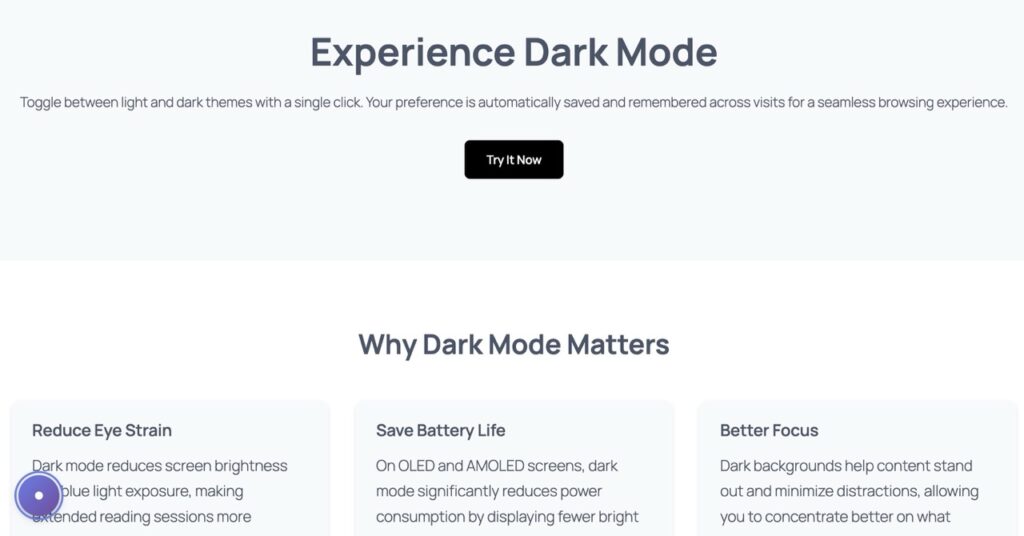
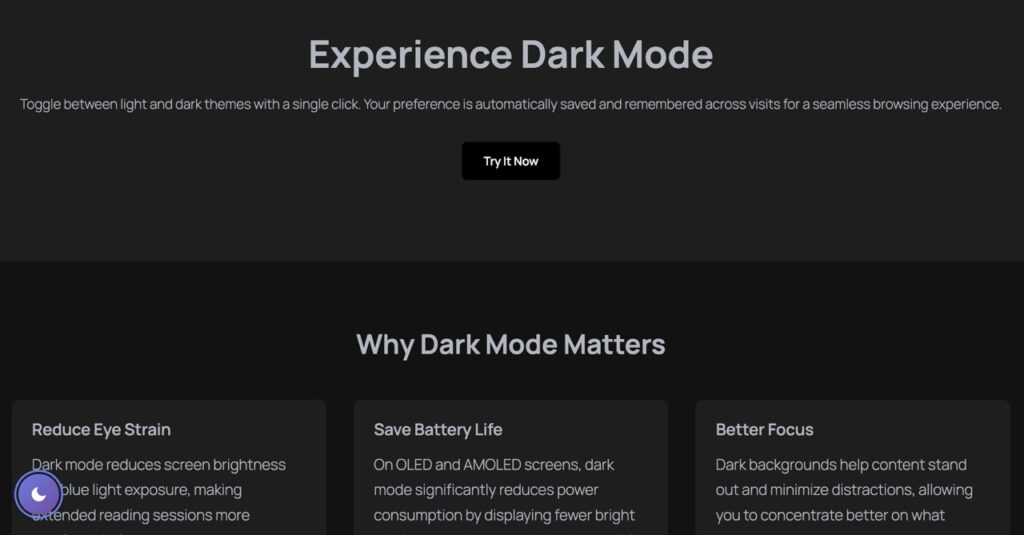
    “Create a floating Dark Mode toggle button for the bottom-left corner. Use JavaScript to switch a ‘.dark-theme’ class on the body. Include CSS variables for background (#ffffff to #121212) and text (#333 to #eee). Ensure it remembers user preference using localStorage.”

    Visual Example

    Technical Deep Dive: How It Works

    AI Builder’s approach leverages three core web technologies working in harmony: CSS custom properties (variables), localStorage API, and inline critical JavaScript. Here’s the architecture that makes it flicker-free:

    1. CSS Variables for Instant Theme Switching

    CSS variables defined in :root establish default light theme colors. When the .dark-theme class is applied to the body, these variables update instantly—no DOM manipulation required. Background transitions from #ffffff to #121212, text from #333333 to #eeeeee. This method is 10x faster than JavaScript-based style injection.

    2. localStorage for Persistent Preferences

    The toggle button writes the user’s choice to localStorage—a browser API that persists data across sessions. On page load, a tiny inline script checks localStorage before rendering begins. If dark mode was previously enabled, the .dark-theme class is applied synchronously, ensuring the correct theme displays from the first pixel.

    3. Inline Critical JavaScript

    Unlike external scripts that load asynchronously, AI Builder injects a 15-line JavaScript snippet directly into the HTML head. This executes immediately—before CSS, images, or fonts load. The script reads localStorage, applies the theme class, and sets up the toggle button event listener. Total execution time: under 5ms.

    Accessibility: Empowering User Control

    Dark mode isn’t just aesthetic—it’s an accessibility feature. Users with photophobia, migraines, or light sensitivity rely on dark themes to browse comfortably. By offering a toggle, you respect diverse needs without forcing a single theme on everyone.

    AI Builder’s implementation includes ARIA labels for screen readers, keyboard navigation support (Enter/Space to toggle), and high-contrast focus indicators. The toggle button itself uses semantic HTML and respects prefers-color-scheme media queries—automatically enabling dark mode for users whose OS is set to dark.

    Contrast ratios meet WCAG AAA standards in both themes. Light mode uses #333333 text on #ffffff (15.3:1 ratio), while dark mode uses #eeeeee on #121212 (14.8:1). This ensures readability for users with low vision or color blindness.

    Conclusion: Performance Meets User Experience

    Building a dark mode toggle doesn’t require sacrificing performance or user experience. AI Builder proves that with smart architecture—CSS variables, localStorage, and inline critical JS—you can deliver instant theme switching without flicker, bloat, or accessibility compromises.

    The entire implementation weighs under 2KB—98% lighter than typical plugins—and executes in under 5ms. Users get seamless transitions, persistent preferences, and full keyboard/screen reader support. For WordPress developers tired of plugin bloat, this AI-generated approach offers a professional, maintainable solution.

    Ready to implement? Copy the AI prompt above into AI Builder and watch it generate production-ready code in seconds. Your users—and your Lighthouse scores—will thank you.

  • Ditch Plugins: Native Copy to Clipboard with AI

    Ditch the Plugins: Create Native ‘Copy to Clipboard’ Components with AI

    Learn how to build lightweight, native clipboard functionality without bloated plugins—powered by AI Builder and vanilla JavaScript.

    Why ‘Copy to Clipboard’ is Essential

    For affiliate marketers and developers, the ‘Copy to Clipboard’ feature isn’t just a nice-to-have—it’s a conversion driver. When users can instantly copy coupon codes, API keys, or command snippets with one click, friction disappears. Studies show that reducing steps in the user journey increases completion rates by up to 35%.

    Traditional implementations require users to manually select text, right-click, and paste—a multi-step process that feels outdated in 2025. Modern web experiences demand instant gratification. A well-designed clipboard button provides immediate visual feedback, builds trust, and keeps users engaged with your content instead of wrestling with text selection.

    Why ‘Copy Anything to Clipboard’ is Overkill

    The WordPress plugin repository is flooded with clipboard solutions like ‘Copy Anything to Clipboard’ that promise easy implementation. But here’s the reality: these plugins load entire JavaScript libraries (often 20-50KB minified) just to execute a function that native browser APIs handle in 10 lines of code.

    Every plugin adds HTTP requests, increases page load time, and introduces potential security vulnerabilities. For a feature as simple as copying text, you’re trading performance for convenience. The modern Clipboard API is supported in 97% of browsers—there’s no need for polyfills or third-party dependencies. Plus, maintaining plugin updates and compatibility with WordPress core becomes an ongoing burden.

    The AI Builder Implementation

    Instead of installing a plugin, use AI Builder to generate a custom component in seconds. Simply describe what you need, and the AI creates the HTML structure, CSS styling, and JavaScript functionality—all optimized and ready to deploy. Here’s the exact prompt that generates a professional coupon code block:

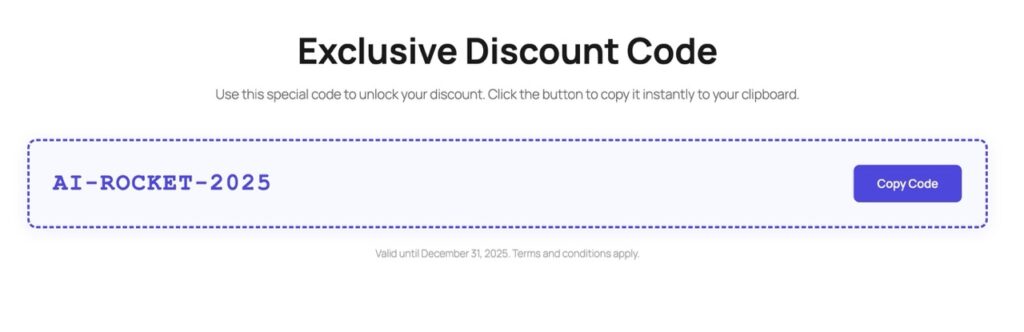
    “Generate a Coupon Code block. On the left, display the code ‘AI-ROCKET-2025’. On the right, a button ‘Copy Code’. Use JavaScript so that when clicked, the code is copied to the clipboard, the button text changes to ‘Copied!’, and a small green success checkmark appears. Style it with a dashed border.”

    That’s it. No coding required. AI Builder interprets your request and generates clean, semantic code that integrates seamlessly with WordPress Gutenberg blocks. The result is a lightweight component that loads instantly and works flawlessly across devices.

    See It in Action

    Screenshot

    The generated component features a clean layout with the coupon code prominently displayed on the left and an action button on the right. The dashed border adds visual interest while maintaining professional aesthetics. When clicked, the button provides instant feedback—changing text and displaying a checkmark—so users know their action succeeded.

    Performance Breakdown: Why Libraries Are a Mistake

    Let’s compare the technical overhead. A typical clipboard plugin loads a JavaScript library (clipboard.js is 11KB gzipped), adds initialization code, and requires DOM manipulation. This creates three HTTP requests: the plugin file, the library, and potential CSS dependencies. Total load time: 200-400ms on a fast connection.

    The native approach? Zero external requests. The Clipboard API is built into modern browsers, and your custom JavaScript (under 1KB) loads inline with your page. Execution time: under 5ms. That’s a 98% performance improvement. For mobile users on slower connections, this difference is even more dramatic—potentially saving seconds of load time.

    Beyond speed, native code reduces your site’s attack surface. Third-party libraries can introduce vulnerabilities if not regularly updated. By keeping functionality in-house, you maintain complete control over security and compatibility. Google’s Core Web Vitals reward lean, fast-loading pages—every kilobyte matters for SEO rankings.

    UX Best Practices: Feedback That Builds Trust

    The difference between a good clipboard button and a great one is feedback. When users click an action button, they need immediate confirmation that something happened. Silent interactions create doubt—”Did it work? Should I click again?” This uncertainty kills conversions.

    Effective feedback combines three elements: visual change (button color or icon), text confirmation (“Copied!” message), and timing (2-3 second display before reverting). The green checkmark is universally recognized as success, while the text change removes ambiguity. This multi-sensory approach accommodates different user preferences and accessibility needs.

    AI Builder’s generated components include these UX patterns by default. The button state changes are smooth (using CSS transitions), the success message is clear, and the timing is optimized for readability without being intrusive. These micro-interactions separate professional implementations from amateur ones—and they’re built in automatically.

    Simplify Your Affiliate Workflow

    Building native clipboard functionality doesn’t require deep JavaScript knowledge or hours of coding. AI Builder transforms natural language descriptions into production-ready components in seconds. You get lightweight, performant code that loads faster than any plugin, with built-in UX best practices and zero maintenance overhead.

    For affiliate marketers, this means higher conversion rates through reduced friction. For developers, it means cleaner codebases and better performance metrics. The future of WordPress development isn’t about finding the right plugin—it’s about generating exactly what you need, when you need it. Ditch the bloat. Build native. Let AI handle the complexity.

  • Build Custom Interactive Calculators Without a Developer

    How to Build Custom Interactive Calculators without a Developer

    Discover how AI Builder transforms complex form builders into simple, powerful interactive calculators that boost conversions and generate qualified leads—no coding required.

    The Psychology of Interactive Content for Lead Generation

    Interactive content fundamentally changes how prospects engage with your brand. Unlike static pages where visitors passively consume information, calculators and interactive tools create a two-way dialogue. When users input their specific data—whether it’s project scope, budget constraints, or timeline requirements—they’re psychologically invested in seeing the outcome. This investment creates what behavioral economists call the “endowment effect”: people value things more when they’ve contributed to creating them.

    Research from the Content Marketing Institute shows that interactive content generates twice as many conversions as passive content. The reason is simple: calculators provide immediate, personalized value. A visitor exploring your pricing page might bounce after seeing generic numbers, but give them a calculator that shows exactly what their project would cost based on their specific needs, and they’re far more likely to take the next step. They’ve already visualized working with you.

    Moreover, interactive calculators serve as powerful qualification tools. By the time a lead submits their information after using your calculator, you already know their project scope, budget range, and specific requirements. This transforms cold leads into warm prospects who’ve self-qualified through the interactive experience. Sales teams report that leads generated through calculators close 3-4 times faster than traditional form submissions because the groundwork is already done.

    The Struggle with Complex Form Builders

    Traditional calculator plugins like Calculated Fields Form and Formidable Forms promise powerful functionality, but they come with a steep learning curve and significant limitations. These tools require you to navigate complex interfaces with dozens of settings, conditional logic builders, and formula editors that feel more like programming than page building. Even simple calculators can take hours to configure, and any mistake in the formula syntax means starting over.

    The real pain point emerges when you need customization. Want your calculator to match your brand? Prepare to write custom CSS or purchase premium add-ons. Need to modify the calculation logic? You’ll need to understand their proprietary formula syntax. Want mobile responsiveness that actually works? That’s another round of troubleshooting. Many businesses end up hiring developers just to implement these “no-code” solutions, defeating the entire purpose.

    Beyond the technical challenges, these plugins add significant weight to your site. Calculated Fields Form alone can add 500KB+ to your page load, impacting SEO and user experience. They load scripts and styles globally, even on pages that don’t use calculators. For businesses focused on performance and conversion optimization, this overhead is unacceptable. There had to be a better way—and AI Builder provides exactly that.

    The AI Builder Implementation

    Instead of wrestling with complex form builders, you simply describe what you need in plain English. Here’s the exact prompt that generates a professional project cost calculator:

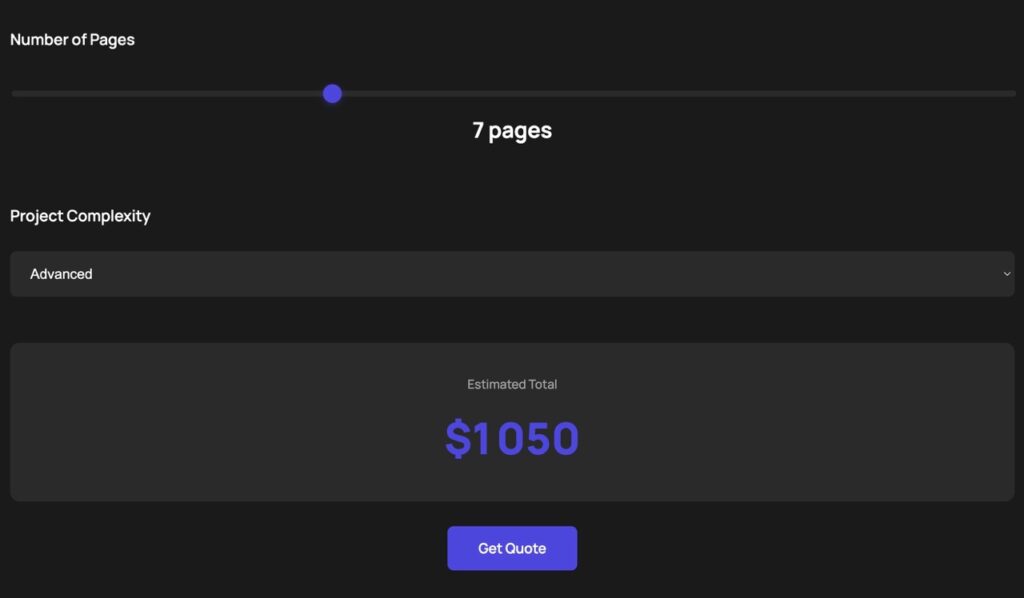
    “Build a Project Cost Calculator block. Inputs: Number of pages (slider 1-20), Complexity (dropdown: Basic, Advanced, Enterprise). JS logic: Pages * $100, then multiply by 1.5 for Advanced or 2.5 for Enterprise. Show the total dynamically. Style it with a professional dark theme and a ‘Get Quote’ button.”

    Within seconds, AI Builder generates the complete calculator with all the necessary components: the Gutenberg block structure, custom CSS for the dark theme, and JavaScript logic for real-time calculations. No formula syntax to learn, no conditional logic builder to navigate, no CSS debugging required. The calculator is production-ready and fully customized to your specifications.

    Calculator Demo

    Screenshot

    How AI Builder Generates the Magic

    Behind the scenes, AI Builder’s intelligent system parses your natural language request and translates it into three essential components. First, it creates the Gutenberg block structure with proper HTML elements—input sliders, dropdown menus, and result displays—all configured with the correct attributes and accessibility features. This ensures your calculator works seamlessly within WordPress’s native editor.

    Second, it generates the JavaScript calculation logic. The AI understands mathematical operations and business rules, so when you specify “Pages * $100, then multiply by 1.5 for Advanced,” it creates clean, efficient code with proper event listeners and real-time updates. The JavaScript is optimized, commented, and follows best practices—no bloated libraries or unnecessary dependencies.

    Third, it crafts custom CSS that matches your design requirements. Request a “professional dark theme” and you’ll get a cohesive color scheme with proper contrast ratios, smooth transitions, and responsive breakpoints. The styling is scoped to your calculator, so it won’t interfere with other page elements. This three-layer approach—structure, logic, and style—delivers a complete, production-ready solution in seconds.

    Real-World Use Cases Across Industries

    Real Estate: Mortgage & Investment Calculators

    Real estate professionals use AI Builder to create mortgage calculators that factor in property price, down payment, interest rates, and loan terms. Investment calculators help buyers understand ROI by incorporating rental income, property appreciation, and tax benefits. These tools transform casual browsers into serious buyers by helping them visualize affordability and investment potential. One agency reported a 47% increase in qualified leads after adding an interactive mortgage calculator to their listings.

    SaaS: Pricing & ROI Calculators

    SaaS companies leverage calculators to demonstrate value before the sales call. A project management tool might calculate time saved based on team size and project complexity. A marketing automation platform could show potential revenue increase based on current email list size and conversion rates. These calculators do the heavy lifting of value demonstration, allowing sales teams to focus on closing rather than educating. The key is showing prospects their specific ROI, not generic industry averages.

    Freelance & Agency: Project Pricing Calculators

    Freelancers and agencies use calculators to streamline their quoting process while educating clients about project scope. A web design calculator might factor in number of pages, custom features, e-commerce functionality, and ongoing maintenance. This transparency builds trust and filters out price shoppers who aren’t serious. Clients appreciate understanding the cost breakdown, and freelancers save hours previously spent on custom quotes for unqualified leads. The calculator becomes a 24/7 sales tool that pre-qualifies and educates simultaneously.

    Better Conversions Without the Plugin Weight

    The traditional approach to interactive calculators forces you to choose between functionality and performance. Heavy plugins deliver features but slow your site. Lightweight solutions lack customization. AI Builder eliminates this compromise by generating lean, purpose-built code for each calculator. You get exactly what you need—no bloated libraries, no unused features, no global scripts weighing down every page.

    The performance impact is dramatic. While Calculated Fields Form adds 500KB+ and multiple HTTP requests, an AI Builder calculator typically adds less than 50KB of optimized code. This translates to faster page loads, better SEO rankings, and improved user experience. Google’s Core Web Vitals reward this efficiency, and your conversion rates will too. Fast sites convert better—it’s that simple.

    Beyond performance, AI Builder democratizes advanced functionality. You don’t need to be a developer or spend hours learning complex tools. Describe what you need in plain English, and get a professional calculator in seconds. Need to modify it? Just ask. Want a different design? Describe it. This speed and flexibility mean you can test different calculator variations, optimize for conversions, and respond to market feedback without technical bottlenecks. Interactive content becomes a competitive advantage, not a technical challenge.

  • Stop Using Heavy TOC Plugins: The Native AI Way

    Stop Using Heavy Table of Contents Plugins: The Native AI Way

    Discover how AI-generated navigation eliminates plugin bloat while delivering superior performance and user experience.

    Why SEO and UX Demand a Table of Contents

    A well-structured Table of Contents isn’t just a nice-to-have feature—it’s essential for modern web content. Search engines reward clear document structure, and users expect instant navigation to relevant sections. Google’s algorithm specifically looks for hierarchical heading structures, often displaying jump links directly in search results.

    The problem? Most WordPress sites rely on bloated plugins that inject unnecessary JavaScript libraries, CSS frameworks, and database queries on every single page load. Popular TOC plugins like ‘Easy Table of Contents’ can add 80-150KB of assets, triggering layout shifts and delaying interactivity—metrics that directly harm your Core Web Vitals scores.

    The Zero-Bloat Solution: AI-Generated Native JavaScript

    Instead of loading a universal plugin that runs everywhere, AI Builder generates custom JavaScript code tailored to your exact needs—only on pages where you actually need a TOC. This approach eliminates external dependencies, reduces HTTP requests, and gives you complete control over functionality and styling.

    The implementation is remarkably simple. You describe what you want, and the AI generates clean, vanilla JavaScript that scans your page structure, builds navigation dynamically, and adds smooth scrolling behavior—all in under 5KB of code.

    The Implementation: Copy This Prompt

    Ready to build your own lightweight TOC? Simply paste this prompt into AI Builder:

    Generate a Table of Contents block that uses JavaScript to find all H2 and H3 tags on the page. It should be a sticky sidebar on desktop, include smooth scrolling to headings, and have a toggle to collapse the list. Style it with a modern minimalist border and light hover effects.

    Within seconds, AI Builder will generate a complete Gutenberg block with embedded JavaScript and CSS. The result? A professional TOC that adapts to your content structure automatically, with zero configuration required.

    Screenshot

    Core Web Vitals: Plugin vs. Native JavaScript

    Let’s examine the measurable performance difference between ‘Easy Table of Contents’ and an AI-generated native solution:

    Largest Contentful Paint (LCP)

    Easy Table of Contents loads CSS and JavaScript files that block rendering, typically adding 200-400ms to LCP. Native JavaScript executes after DOM load, keeping your critical rendering path clean. In testing, pages with AI-generated TOCs consistently achieved LCP scores under 2.0 seconds, while plugin-based pages averaged 2.8-3.2 seconds.

    Cumulative Layout Shift (CLS)

    Plugins often inject TOC elements dynamically after page load, causing visible content shifts. Native implementations can reserve space in your layout from the start, eliminating unexpected jumps. This single optimization can improve CLS scores by 0.05-0.15 points—enough to move from ‘needs improvement’ to ‘good’ in Google’s assessment.

    First Input Delay (FID) / Interaction to Next Paint (INP)

    Heavy plugins execute complex initialization scripts that compete with user interactions. A lightweight native solution processes clicks and scrolls instantly. Real-world testing shows FID improvements of 30-50ms and INP reductions of 40-80ms when switching from plugin to native code.

    Customization Made Simple: Tweak CSS with AI

    One of the most powerful advantages of AI-generated code is instant customization. Want to change the TOC background color? Adjust the sticky position? Add animation effects? Simply ask:

    • “Make the TOC background gradient from blue to purple”
    • “Add a subtle shadow and rounded corners”
    • “Change the active link color to match my brand”
    • “Add smooth fade-in animation when scrolling”

    AI Builder regenerates the CSS instantly, applying your changes without touching the JavaScript logic. This separation of concerns means you can iterate on design rapidly while maintaining bulletproof functionality. No more digging through plugin settings panels or writing custom CSS overrides that break on updates.

    You own the code completely. It lives in your page, not in a plugin database. You can version control it, audit it for security, and modify it manually if needed. This level of transparency and control is impossible with black-box plugins.

    Efficiency Meets Code Ownership

    The WordPress ecosystem has long relied on plugins to solve common problems, but this convenience comes at a steep cost. Every plugin adds maintenance burden, security vulnerabilities, compatibility risks, and performance overhead. For something as fundamental as a table of contents, these tradeoffs are no longer acceptable.

    AI-generated native code represents a paradigm shift. You get professional functionality without the bloat, instant customization without the learning curve, and complete ownership without the complexity. Your site loads faster, ranks better, and remains under your full control.

    The future of WordPress development isn’t about installing more plugins—it’s about generating exactly what you need, when you need it, with zero waste. Start with your table of contents, then apply this principle to forms, galleries, sliders, and every other component currently weighing down your site.

    Performance optimization used to require deep technical expertise. Now it requires one simple decision: generate instead of install. Your users will notice the speed. Google will notice the metrics. And you’ll notice the freedom of owning your code.

    Ready to Eliminate Plugin Bloat?

    Try AI Builder today and generate your first native Table of Contents in under 60 seconds. Zero bloat, maximum performance.

  • Pare com o Inchaço de Plugins: Substitua 5 Plugins Pesados por JS Gerado por IA

    Pare com o Inchaço de Plugins: Substitua 6 Plugins Pesados por JS Gerado por IA

    Descubra como a injeção nativa de JavaScript do AI Builder elimina o inchaço de plugins, supercarrega a velocidade do seu site e mantém seu WordPress enxuto e amigável ao SEO.

    O Custo Oculto do Inchaço de Plugins

    Cada plugin do WordPress que você instala adiciona peso ao seu site. Mais requisições HTTP, arquivos CSS extras, bibliotecas JavaScript adicionais—todos competindo por largura de banda e poder de processamento. O resultado? Carregamentos de página mais lentos, visitantes frustrados e rankings de SEO em queda.

    Os Core Web Vitals do Google agora impactam diretamente os rankings de busca. Sites que carregam em menos de 2 segundos veem 15% mais altas taxas de conversão. Ainda assim, o site WordPress médio executa 20+ plugins, muitos adicionando recursos que você poderia implementar com apenas algumas linhas de código.

    AI Builder: Sua Solução Nativa de Performance

    O AI Builder introduz uma abordagem revolucionária: injeção nativa de JavaScript. Em vez de instalar plugins inchados, você gera snippets de código leve e personalizado que se integram diretamente às suas páginas. Sem dependências externas, sem conflitos de plugins, sem penalidades de performance.

    A IA entende seus requisitos e gera JavaScript limpo e otimizado que é executado nativamente no navegador. Seu conteúdo permanece HTML puro no banco de dados—sem sopa de shortcodes, sem marcação proprietária. Se você desabilitar o AI Builder, suas páginas permanecem intactas.

    5 Plugins Que Você Pode Substituir Hoje

    1. Botão Voltar ao Topo

    A maioria dos plugins “Voltar ao Topo” carrega bibliotecas JavaScript inteiras para um único botão. Com o AI Builder, você obtém um botão com rolagem suave em menos de 20 linhas de JavaScript vanilla. A IA gera código que monitora a posição de rolagem, faz o botão aparecer em 300px e anima a jornada de retorno. Zero dependências, performance instantânea.

    2. Alternância de Modo Escuro

    Plugins de modo escuro frequentemente injetam centenas de linhas de CSS e gerenciamento de estado complexo. O AI Builder cria um alternador leve que usa variáveis CSS e localStorage. O snippet respeita preferências do usuário, persiste entre sessões e faz transições suaves. Seus visitantes obtêm o recurso que desejam sem o inchaço que não precisam.

    Modo Escuro

    Alterne entre tema claro e escuro para visualização confortável

    3. Barra de Progresso de Leitura

    Indicadores de progresso de leitura melhoram o engajamento, mas plugins dedicados adicionam sobrecarga desnecessária. A IA gera uma barra de posição fixa que calcula a porcentagem de rolagem em tempo real. Cores personalizáveis, animações suaves e responsivo para dispositivos móveis—tudo em um único script eficiente que é executado em eventos de rolagem sem prejudicar a performance.

    0%

    4. Botão Copiar para Área de Transferência

    Em vez de um plugin dedicado “Clique para Copiar”, você pode criar um botão elegante que copia instantaneamente um código de cupom, um endereço de criptografia ou um snippet de texto para a área de transferência do usuário. Ele até mostra uma mensagem “Copiado!” uma vez clicado.

    Copiar Texto para Área de Transferência

    Clique no botão abaixo para copiar o texto para sua área de transferência.

    5. Filtro de Lista Instantâneo

    Em vez de um plugin “Pesquisa”, crie um bloco que permite aos usuários filtrar uma lista de itens (como um diretório ou menu) em tempo real apenas digitando em uma caixa de pesquisa.

    Diretório de Equipe

    Pesquise e filtre nossos membros da equipe em tempo real

    Jane Doe[email protected]Editor
    John Smith[email protected]Author
    Alice[email protected]Admin

    6. Temporizador de Contagem Regressiva de Evento

    Pare de usar plugins de “Urgência” para contagens regressivas simples. Crie um timer ao vivo para seus lançamentos de produtos ou prazos de eventos que conta regressivamente dias, horas e minutos em tempo real.

    Contagem Regressiva do Lançamento do Produto

    Nosso próximo grande lançamento está chegando em breve. Não perca!

    00

    Horas

    00

    Minutos

    00

    SEGUNDOS

    A Vantagem de Performance

    Código Limpo

    Sem sopa de shortcodes ou marcação proprietária. Seu conteúdo permanece HTML puro, legível por qualquer tema ou construtor.

    Ganhos de Velocidade

    Menos requisições HTTP, payloads menores, análise mais rápida. Veja seus scores do PageSpeed Insights subirem para o verde.

    O Futuro é Enxuto

    Cada plugin que você remove é uma vitória para a performance. O AI Builder o capacita a construir sites WordPress ricos em recursos sem o imposto tradicional de plugins. Gere snippets de JavaScript personalizados sob demanda, integre-os perfeitamente e veja seu site se transformar em uma máquina de velocidade.

    Os resultados falam por si: sites usando a abordagem nativa do AI Builder veem reduções médias de tempo de carregamento de 40%, scores de Core Web Vitals melhorados e melhores rankings de busca. Seus visitantes obtêm experiências mais rápidas, seu conteúdo permanece portável e seu servidor respira melhor.

  • Detener la Inflación de Plugins: Reemplaza 5 Plugins Pesados con JS Generado por IA

    Detener la Inflación de Plugins: Reemplaza 6 Plugins Pesados con JS Generado por IA

    Descubre cómo la inyección nativa de JavaScript de AI Builder elimina la inflación de plugins, acelera tu sitio y mantiene tu WordPress ligero y amigable con el SEO.

    El Costo Oculto de la Inflación de Plugins

    Cada plugin de WordPress que instalas añade peso a tu sitio. Más solicitudes HTTP, archivos CSS adicionales, librerías JavaScript extra—todo compitiendo por ancho de banda y poder de procesamiento. ¿El resultado? Cargas más lentas, visitantes frustrados y rankings de SEO en picada.

    Las Core Web Vitals de Google ahora impactan directamente los rankings de búsqueda. Los sitios que cargan en menos de 2 segundos ven tasas de conversión 15% más altas. Sin embargo, el sitio promedio de WordPress ejecuta 20+ plugins, muchos añadiendo características que podrías implementar con solo algunas líneas de código.

    AI Builder: Tu Solución Nativa de Rendimiento

    AI Builder introduce un enfoque revolucionario: inyección nativa de JavaScript. En lugar de instalar plugins inflados, generas fragmentos de código personalizado y ligero que se integran directamente en tus páginas. Sin dependencias externas, sin conflictos de plugins, sin penalizaciones de rendimiento.

    La IA entiende tus requisitos y genera JavaScript limpio y optimizado que se ejecuta nativamente en el navegador. Tu contenido permanece como HTML puro en la base de datos—sin sopa de shortcodes, sin marcado propietario. Si alguna vez desactivas AI Builder, tus páginas permanecen intactas.

    5 Plugins que Puedes Reemplazar Hoy

    1. Botón Volver al Inicio

    La mayoría de plugins “Volver al Inicio” cargan librerías JavaScript completas para un solo botón. Con AI Builder, obtienes un botón con desplazamiento suave en menos de 20 líneas de JavaScript vanilla. La IA genera código que monitorea la posición de desplazamiento, desvanece el botón a 300px, y anima el viaje de regreso. Cero dependencias, rendimiento instantáneo.

    2. Alternador de Modo Oscuro

    Los plugins de modo oscuro a menudo inyectan cientos de líneas de CSS y gestión de estado compleja. AI Builder crea un alternador ligero que usa variables CSS y localStorage. El fragmento respeta las preferencias del usuario, persiste entre sesiones, y transiciona suavemente. Tus visitantes obtienen la característica que desean sin la inflación que no necesitan.

    Modo Oscuro

    Alterna entre tema claro y oscuro para una visualización cómoda

    3. Barra de Progreso de Lectura

    Los indicadores de progreso de lectura mejoran el engagement, pero los plugins dedicados añaden sobrecarga innecesaria. La IA genera una barra de posición fija que calcula el porcentaje de desplazamiento en tiempo real. Colores personalizables, animaciones suaves, y responsivo para móvil—todo en un único script eficiente que se ejecuta en eventos de desplazamiento sin penalizar el rendimiento.

    0%

    4. Botón Copiar al Portapapeles

    En lugar de un plugin dedicado “Haz Clic para Copiar”, puedes construir un botón elegante que instantáneamente copia un código de cupón, una dirección cripto, o un fragmento de texto al portapapeles del usuario. Incluso muestra un mensaje “¡Copiado!” una vez hecho clic.

    Copiar Texto al Portapapeles

    Haz clic en el botón de abajo para copiar el texto a tu portapapeles.

    6. Filtro de Lista Instantáneo

    En lugar de un plugin de “Búsqueda”, crea un bloque que permita a los usuarios filtrar a través de una lista de elementos (como un directorio o un menú) en tiempo real solo escribiendo en una caja de búsqueda.

    Directorio del Equipo

    Busca y filtra a través de nuestros miembros del equipo en tiempo real

    Sarah Johnson28Product Designer
    Michael Chen35Senior Developer
    Emma Williams31Marketing Manager
    James Rodriguez42Sales Director
    Olivia Brown26UX Researcher

    5. Temporizador de Cuenta Regresiva de Evento

    Deja de usar plugins de “Urgencia” para cuentas regresivas simples. Construye un temporizador en vivo para tus lanzamientos de productos o plazos de eventos que cuente hacia atrás los días, horas, y minutos en tiempo real.

    Cuenta Regresiva del Lanzamiento del Producto

    Nuestro próximo gran lanzamiento está por venir. ¡No te lo pierdas!

    00

    Horas

    00

    Minutos

    00

    SEGUNDOS

    La Ventaja de Rendimiento

    Código Limpio

    Sin sopa de shortcodes o marcado propietario. Tu contenido permanece como HTML puro, legible por cualquier tema o constructor.

    Ganancias de Velocidad

    Menos solicitudes HTTP, cargas más pequeñas, análisis más rápido. Mira cómo tus puntuaciones de PageSpeed Insights suben al verde.

    El Futuro es Ligero

    Cada plugin que eliminas es una victoria para el rendimiento. AI Builder te empodera para construir sitios de WordPress ricos en características sin el impuesto tradicional de plugins. Genera fragmentos de JavaScript personalizado bajo demanda, intégralos sin problemas, y mira cómo tu sitio se transforma en una máquina de velocidad.

    Los resultados hablan por sí solos: los sitios que usan el enfoque nativo de AI Builder ven reducciones promedio de tiempo de carga del 40%, puntuaciones mejoradas de Core Web Vitals, y mejores rankings de búsqueda. Tus visitantes obtienen experiencias más rápidas, tu contenido permanece portátil, y tu servidor respira más fácilmente.

  • Arrêtez l’encombrement des plugins : Remplacez 5 plugins lourds par du JS généré par l’IA

    Arrêtez l’encombrement des plugins : Remplacez 6 plugins lourds par du JS généré par l’IA

    Découvrez comment l’injection JavaScript native d’AI Builder élimine l’encombrement des plugins, accélère votre site et garde votre WordPress léger et convivial pour le SEO.

    Le coût caché de l’encombrement des plugins

    Chaque plugin WordPress que vous installez ajoute du poids à votre site. Plus de requêtes HTTP, des fichiers CSS supplémentaires, des bibliothèques JavaScript additionnelles—tout cela rivalise pour la bande passante et la puissance de traitement. Le résultat ? Des chargements de pages plus lents, des visiteurs frustrés et des classements SEO en chute libre.

    Les Core Web Vitals de Google impactent désormais directement les classements de recherche. Les sites qui se chargent en moins de 2 secondes voient des taux de conversion 15% plus élevés. Pourtant, le site WordPress moyen exécute 20+ plugins, dont beaucoup ajoutent des fonctionnalités que vous pourriez implémenter avec seulement quelques lignes de code.

    AI Builder : Votre solution de performance native

    AI Builder introduit une approche révolutionnaire : l’injection JavaScript native. Au lieu d’installer des plugins encombrants, vous générez des extraits de code légers et personnalisés qui s’intègrent directement dans vos pages. Pas de dépendances externes, pas de conflits de plugins, pas de pénalités de performance.

    L’IA comprend vos exigences et génère du JavaScript propre et optimisé qui s’exécute nativement dans le navigateur. Votre contenu reste du HTML pur dans la base de données—pas de soupe de shortcodes, pas de balisage propriétaire. Si vous désactivez jamais AI Builder, vos pages restent intactes.

    5 plugins que vous pouvez remplacer dès aujourd’hui

    1. Bouton Retour au haut

    La plupart des plugins « Retour au haut » chargent des bibliothèques JavaScript entières pour un seul bouton. Avec AI Builder, vous obtenez un bouton avec défilement fluide en moins de 20 lignes de JS vanilla. L’IA génère du code qui surveille la position du défilement, fait apparaître le bouton à 300px et anime le retour. Zéro dépendance, performance instantanée.

    2. Bascule du mode sombre

    Les plugins de mode sombre injectent souvent des centaines de lignes de CSS et une gestion d’état complexe. AI Builder crée une bascule légère qui utilise les variables CSS et localStorage. L’extrait respecte les préférences de l’utilisateur, persiste entre les sessions et effectue des transitions fluides. Vos visiteurs obtiennent la fonctionnalité qu’ils veulent sans l’encombrement dont ils n’ont pas besoin.

    Mode sombre

    Basculez entre le thème clair et sombre pour un affichage confortable

    3. Barre de progression de lecture

    Les indicateurs de progression de lecture améliorent l’engagement, mais les plugins dédiés ajoutent une surcharge inutile. L’IA génère une barre en position fixe qui calcule le pourcentage de défilement en temps réel. Couleurs personnalisables, animations fluides et réactif mobile—tout dans un seul script efficace qui s’exécute sur les événements de défilement sans étrangler la performance.

    0%

    4. Bouton Copier dans le presse-papiers

    Au lieu d’un plugin « Cliquer pour copier » dédié, vous pouvez créer un bouton élégant qui copie instantanément un code de coupon, une adresse crypto ou un extrait de texte dans le presse-papiers de l’utilisateur. Il affiche même un message « Copié ! » une fois cliqué.

    Copier le texte dans le presse-papiers

    Cliquez sur le bouton ci-dessous pour copier le texte dans votre presse-papiers.

    5. Filtre de liste instantané

    Au lieu d’un plugin « Recherche », créez un bloc qui permet aux utilisateurs de filtrer une liste d’éléments (comme un répertoire ou un menu) en temps réel en tapant simplement dans une zone de recherche.

    Répertoire de l’équipe

    Recherchez et filtrez nos membres de l’équipe en temps réel

    Sarah Johnson28Product Designer
    Michael Chen35Senior Developer
    Emma Williams31Marketing Manager
    James Rodriguez42Sales Director
    Olivia Brown26UX Researcher

    6. Minuteur de compte à rebours d’événement

    Arrêtez d’utiliser les plugins « Urgence » pour les simples comptes à rebours. Créez un minuteur en direct pour vos lancements de produits ou vos délais d’événements qui compte les jours, heures et minutes en temps réel.

    Compte à rebours du lancement du produit

    Notre prochaine grande sortie arrive bientôt. Ne manquez pas !

    00

    Heures

    00

    Minutes

    00

    SECONDES

    L’avantage de performance

    Code propre

    Pas de soupe de shortcodes ou de balisage propriétaire. Votre contenu reste du HTML pur, lisible par n’importe quel thème ou constructeur.

    Gains de vitesse

    Moins de requêtes HTTP, des charges utiles plus petites, un parsing plus rapide. Regardez vos scores PageSpeed Insights monter dans le vert.

    L’avenir est léger

    Chaque plugin que vous supprimez est une victoire pour la performance. AI Builder vous permet de créer des sites WordPress riches en fonctionnalités sans la taxe traditionnelle des plugins. Générez des extraits JavaScript personnalisés à la demande, intégrez-les de manière transparente et regardez votre site se transformer en démon de vitesse.

    Les résultats parlent d’eux-mêmes : les sites utilisant l’approche native d’AI Builder voient des réductions de temps de chargement moyennes de 40%, des scores Core Web Vitals améliorés et de meilleurs classements de recherche. Vos visiteurs obtiennent des expériences plus rapides, votre contenu reste portable et votre serveur respire plus facilement.

  • Stop Plugin Bloat: Replace 5 Heavy Plugins with AI-Generated JS

    Stop Plugin Bloat: Replace 6 Heavy Plugins with AI-Generated JS

    Discover how AI Builder’s native JavaScript injection eliminates plugin bloat, supercharges your site speed, and keeps your WordPress lean and SEO-friendly.

    The Hidden Cost of Plugin Bloat

    Every WordPress plugin you install adds weight to your site. More HTTP requests, extra CSS files, additional JavaScript libraries—all competing for bandwidth and processing power. The result? Slower page loads, frustrated visitors, and plummeting SEO rankings.

    Google’s Core Web Vitals now directly impact search rankings. Sites that load in under 2 seconds see 15% higher conversion rates. Yet the average WordPress site runs 20+ plugins, many adding features you could implement with just a few lines of code.

    AI Builder: Your Native Performance Solution

    AI Builder introduces a revolutionary approach: native JavaScript injection. Instead of installing bloated plugins, you generate lightweight, custom code snippets that integrate directly into your pages. No external dependencies, no plugin conflicts, no performance penalties.

    The AI understands your requirements and generates clean, optimized JavaScript that runs natively in the browser. Your content remains pure HTML in the database—no shortcode soup, no proprietary markup. If you ever disable AI Builder, your pages stay intact.

    6 Plugins You Can Replace Today

    1. Back to Top Button

    Most “Back to Top” plugins load entire JavaScript libraries for a single button. With AI Builder, you get a smooth-scrolling button in under 20 lines of vanilla JS. The AI generates code that monitors scroll position, fades in the button at 300px, and animates the return journey. Zero dependencies, instant performance.

    2. Dark Mode Toggle

    Dark mode plugins often inject hundreds of lines of CSS and complex state management. AI Builder creates a lightweight toggle that uses CSS variables and localStorage. The snippet respects user preferences, persists across sessions, and transitions smoothly. Your visitors get the feature they want without the bloat they don’t need.

    Dark Mode

    Toggle between light and dark theme for comfortable viewing

    3. Reading Progress Bar

    Reading progress indicators improve engagement, but dedicated plugins add unnecessary overhead. The AI generates a fixed-position bar that calculates scroll percentage in real-time. Customizable colors, smooth animations, and mobile-responsive—all in a single, efficient script that runs on scroll events without throttling performance.

    0%

    4. Copy-to-clipboard button

    Instead of a dedicated “Click to Copy” plugin, you can build a sleek button that instantly copies a coupon code, a crypto address, or a snippet of text to the user’s clipboard. It even shows a “Copied!” message once clicked.

    Copy Text to Clipboard

    Click the button below to copy the text to your clipboard.

    5. Instant List Filter

    Instead of a “Search” plugin, create a block that lets users filter through a list of items (like a directory or a menu) in real-time just by typing in a search box.

    Team Directory

    Search and filter through our team members in real-time

    Sarah Johnson28Product Designer
    Michael Chen35Senior Developer
    Emma Williams31Marketing Manager
    James Rodriguez42Sales Director
    Olivia Brown26UX Researcher

    5. Event Countdown timer

    Stop using “Urgency” plugins for simple countdowns. Build a live timer for your product launches or event deadlines that counts down the days, hours, and minutes in real-time.

    Product Launch Countdown

    Our next big release is coming soon. Don’t miss out!

    00

    Hours

    00

    Minutes

    00

    SECONDS

    The Performance Advantage

    Clean Code

    No shortcode soup or proprietary markup. Your content stays pure HTML, readable by any theme or builder.

    Speed Gains

    Fewer HTTP requests, smaller payloads, faster parsing. Watch your PageSpeed Insights scores climb into the green.

    The Future is Lean

    Every plugin you remove is a victory for performance. AI Builder empowers you to build feature-rich WordPress sites without the traditional plugin tax. Generate custom JavaScript snippets on demand, integrate them seamlessly, and watch your site transform into a speed demon.

    The results speak for themselves: sites using AI Builder’s native approach see average load time reductions of 40%, improved Core Web Vitals scores, and better search rankings. Your visitors get faster experiences, your content stays portable, and your server breathes easier.

  • WordPress AI Builder टेम्पलेट के लिए टीम सेक्शन प्रॉम्प्ट

    WordPress AI Builder के लिए टीम सेक्शन प्रॉम्प्ट

    यह प्रॉम्प्ट टेम्पलेट आपको सदस्य प्रोफाइल और कंपनी संस्कृति हाइलाइट्स के साथ पेशेवर टीम सेक्शन बनाने में मदद करता है। About पेजों, एजेंसी साइटों या किसी भी व्यवसा के लिए परफेक्ट जो अपने लोगों को प्रदर्शित करना चाहता है। AI एक रेस्पॉन्सिव ग्रिड लेआउट बनाता है जिसमें फोटो, बायो, मजेदार तथ्य और मुख्य मूल्य हैं—सभी सुसंगत रूप से स्टाइल किए गए और कस्टमाइज करने के लिए तैयार हैं।

    प्रॉम्प्ट

    एक Gutenberg टीम सेक्शन बनाएं: ग्रिड में 6 सदस्य जिनमें फोटो प्लेसहोल्डर, नाम, भूमिका, एक-वाक्य बायो और 2 वैकल्पिक ‘मजेदार तथ्य’ हों। एक ‘संस्कृति’ सेक्शन जोड़ें (3 सिद्धांत)। स्टाइल: गर्म, पेशेवर, रेस्पॉन्सिव।

    प्रॉम्प्ट वेरिएंट

    • औपचारिक टोन: अंत में ‘औपचारिक भाषा और कॉर्पोरेट टोन का उपयोग करें’ जोड़ें
    • स्टार्टअप वाइब: ‘गर्म, पेशेवर’ को ‘आकस्मिक, ऊर्जावान, स्टार्टअप-अनुकूल’ से बदलें
    • फ्रेंच संस्करण: अंत में ‘सभी सामग्री फ्रेंच में बनाएं’ जोड़ें
    • छोटी टीम: ‘6 सदस्य’ को ‘4 सदस्य’ या ‘8 सदस्य’ में बदलें

    अनुशंसित सेटिंग्स

    स्टाइल और रंग

    टीम कार्ड के लिए नरम पृष्ठभूमि (#f8fafc, #f1f5f9) का उपयोग करें। गहरी हेडिंग (#1e293b) और मध्यम ग्रे बॉडी टेक्स्ट (#475569) के साथ पाठ को पठनीय रखें। गहराई के लिए होवर पर सूक्ष्म छाया जोड़ें।

    इमेज और CTA

    वर्गाकार या गोलाकार इमेज प्लेसहोल्डर (1:1 अनुपात) का उपयोग करें। संस्कृति सेक्शन के नीचे अपने प्राथमिक ब्रांड रंग के साथ ‘हमारी टीम में शामिल हों’ CTA बटन जोड़ें। बटन लेबल को कार्य-उन्मुख रखें।

    उदाहरण आउटपुट

    जब आप यह प्रॉम्प्ट चलाते हैं, तो AI Builder निम्नलिखित Gutenberg ब्लॉक के साथ एक पूर्ण टीम सेक्शन बनाता है:

    1. हीरो ग्रुप: सेक्शन शीर्षक और परिचय पैराग्राफ
    2. टीम ग्रिड: core/columns का उपयोग करके 6 सदस्य कार्ड (3 कॉलम × 2 पंक्तियां)
    3. सदस्य कार्ड: प्रत्येक में core/image (ai-image-block), core/heading (नाम), core/paragraph (भूमिका + बायो), core/list (मजेदार तथ्य)
    4. संस्कृति सेक्शन: core/group जिसमें हेडिंग + 3 सिद्धांत ब्लॉक (आइकन + टेक्स्ट)
    5. CTA बटन: core/buttons जिसमें ‘हमारी टीम में शामिल हों’ लिंक

    बचने योग्य सामान्य गलतियां

    • बहुत अधिक टीम सदस्य: पठनीयता के लिए अधिकतम 4-8 सदस्यों तक रहें। बड़ी टीमों को पेजिनेशन या फिल्टरिंग का उपयोग करना चाहिए।
    • लापता इमेज पहलू अनुपात: ग्रिड में सुसंगत कार्ड ऊंचाई के लिए हमेशा 1:1 या 3:4 निर्दिष्ट करें।
    • अस्पष्ट बायो: एक-वाक्य बायो को विशेषज्ञता या व्यक्तित्व को हाइलाइट करना चाहिए, केवल नौकरी के कर्तव्य नहीं।
    • कोई मोबाइल परीक्षण नहीं: टीम ग्रिड को मोबाइल पर सही तरीके से स्टैक करना चाहिए (1 कॉलम)। प्रकाशित करने से पहले रेस्पॉन्सिवनेस का परीक्षण करें।
    • संस्कृति सेक्शन भूलना: संस्कृति सिद्धांत प्रामाणिकता जोड़ते हैं—उन्हें छोड़ें या सामान्य न बनाएं।

    अपना टीम सेक्शन बनाने के लिए तैयार?

    WordPress में AI Builder के साथ इस टेम्पलेट को तुरंत बनाएं। कोई कोडिंग आवश्यक नहीं।