
How to Build Stunning Pages with the Twenty Twenty-Five Theme Using AI Builder
A practical guide for site owners, freelancers, and small business owners who want to create professional pages faster — without writing a single line of code.
Since WordPress 6.7, Twenty Twenty-Five has been the default theme — and for good reason. It brings a minimalist, elegant design philosophy to the table, featuring the beautiful Manrope typeface, carefully curated neutral color palettes, and an impressive library of 70+ built-in block patterns. Whether you’re building a personal blog, a freelance portfolio, or a small business website, Twenty Twenty-Five gives you a stunning foundation to work from.
But here’s the challenge: while the theme is undeniably beautiful, crafting custom pages with unique layouts, branded copy, and polished visuals still demands real time and design skills. You need to assemble blocks, write compelling content, choose the right spacing, and make everything look cohesive — all before you’ve even launched.
That’s exactly where AI Builder comes in. AI Builder is a powerful WordPress plugin that generates complete, fully editable Gutenberg pages — including blocks, custom CSS, and AI-generated images — from a single text prompt. It works natively with any WordPress theme, including Twenty Twenty-Five, inheriting your active theme’s fonts, colors, and layout settings automatically. The result? Professional pages in minutes, not hours.
What Makes Twenty Twenty-Five Special
Twenty Twenty-Five was designed around a single guiding principle: simplicity that adapts. Unlike many themes that impose a rigid visual identity, Twenty Twenty-Five is intentionally neutral — it gets out of your way and lets your content shine. This makes it an incredibly versatile starting point for almost any type of website.
One of its standout features is its 9 style variations, each offering a distinct visual personality — from warm earthy tones to crisp monochrome palettes. These variations let you completely transform the look of your site without touching a single line of code. Combined with its section styles and flexible block patterns, the theme gives designers and non-designers alike a powerful toolkit.
Because Twenty Twenty-Five is built entirely on the Gutenberg block editor, every element of your page is a block — headings, paragraphs, images, buttons, columns, and more. This block-first architecture is what makes it so compatible with tools like AI Builder, which generates native Gutenberg blocks that slot seamlessly into the editor.
It’s no surprise that Twenty Twenty-Five has quickly become a favourite for blogs, portfolios, and small business websites. Its clean aesthetic communicates professionalism and trustworthiness — two qualities that matter enormously when you’re trying to win clients or grow an audience online.
What Is AI Builder?
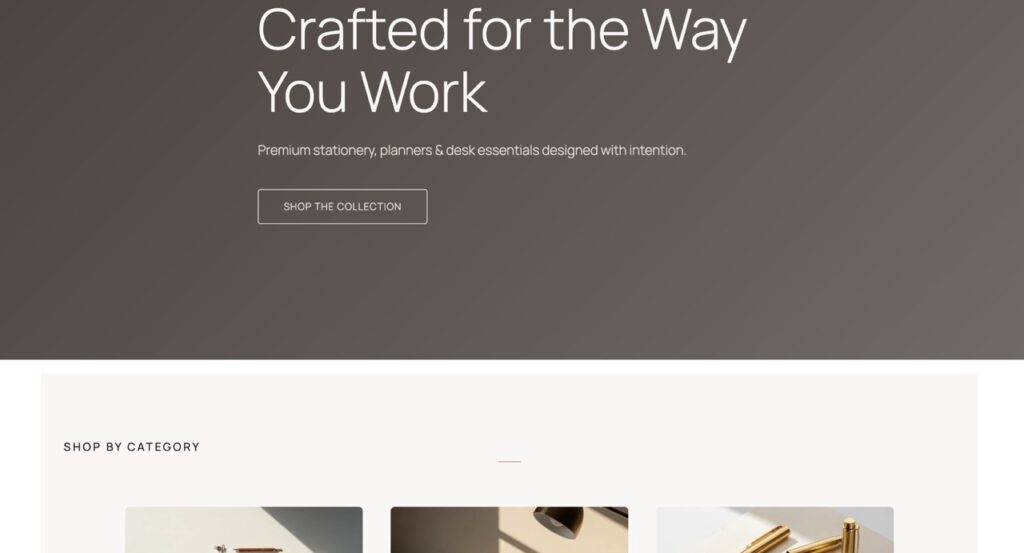
AI Builder is a WordPress plugin that turns a plain text description into a complete, ready-to-publish page — instantly. You simply describe what you want (“Create a freelance designer portfolio homepage with a hero section, services list, and contact CTA”), and AI Builder generates the full Gutenberg block layout, writes the copy, applies custom CSS, and even creates AI-generated images to match your vision.
What sets AI Builder apart from generic AI tools is its deep WordPress integration. It doesn’t generate HTML that you have to paste somewhere — it generates native Gutenberg blocks that appear directly in your editor, fully editable, just like blocks you’d create by hand. Every heading, paragraph, button, and image is a real WordPress block that you can modify, rearrange, or delete.
AI Builder also reads your active theme’s settings — including fonts, color palettes, and layout widths — and applies them automatically. This means pages generated with AI Builder look like they were designed specifically for your theme, not pasted in from somewhere else. You can also configure brand identity settings (your brand colors, tone of voice, and business description) so every generated page feels on-brand from the first draft.
Getting started is refreshingly simple: no API key is required, and you receive 100 free credits when you sign up. That’s enough to generate several complete pages and explore the plugin’s full capabilities before committing to anything. It’s one of the most accessible AI tools available for WordPress users today.
AI Builder + Twenty Twenty-Five: A Perfect Match
When you run AI Builder on a site using Twenty Twenty-Five, something genuinely exciting happens: the plugin detects your active theme’s settings and generates pages that look native to the theme. The AI applies Twenty Twenty-Five’s clean aesthetic — its generous whitespace, elegant typography, and restrained color usage — automatically. You don’t need to configure anything special.
This compatibility means you get the best of both worlds: Twenty Twenty-Five’s beautiful, minimal design language combined with AI Builder’s speed and intelligence. Pages feel cohesive, professional, and intentional — not like they were assembled by a robot.
3 Prompt Examples to Try Right Now
- Freelance Portfolio Homepage: “Create a clean, modern portfolio homepage for a freelance UX designer. Include a hero section with a tagline, a featured projects grid, a short about section, and a contact CTA button.”
- Café Landing Page: “Build a warm, inviting landing page for a neighbourhood café. Include a hero with opening hours, a menu highlights section, a photo gallery, and a reservation button.”
- Product Launch Page: “Generate a high-converting product launch page for a new productivity app. Include a bold hero, a features section with icons, social proof quotes, pricing tiers, and a download CTA.”
Each of these prompts will produce a complete, multi-section page in seconds. The more detail you include in your prompt — your brand name, target audience, tone, and key messages — the more tailored and impressive the result will be. Think of it as briefing a very fast, very talented designer.
Step-by-Step: Creating Your First Page with AI Builder
Ready to try it yourself? Here’s exactly how the workflow looks from start to finish — it’s simpler than you might expect!
Step 1 — Install and Activate AI Builder
Head to your WordPress dashboard, go to Plugins → Add New, and search for “AI Builder”. Install and activate the plugin. You’ll be prompted to create a free account — this takes about 30 seconds and gives you your 100 free credits immediately. No credit card, no API key, no complicated setup.
Step 2 — Open the Gutenberg Editor
Create a new page or open an existing one in the Gutenberg editor. You’ll notice a new AI Builder icon in the editor toolbar — a small chat bubble or wand icon, depending on your version. Click it to open the AI Builder panel on the right side of your screen.
Step 3 — Type Your Prompt
In the AI Builder chat panel, type a description of the page you want to create. Be as specific as you like — mention your business name, the sections you want, your target audience, and the tone you’re going for. The more context you provide, the better the result. Then hit Generate and watch the magic happen.
Step 4 — Review and Edit Your Page
Within seconds, AI Builder populates your editor with a complete, multi-section page. Every element is a standard Gutenberg block — you can click any heading to edit the text, swap out images, change button colors, reorder sections, or delete anything you don’t need. The page is yours to customise completely. When you’re happy, simply hit Publish. That’s it!
The entire process — from opening the editor to having a publish-ready page — typically takes under five minutes. For freelancers juggling multiple client projects, or small business owners who don’t have a dedicated web designer, this is genuinely transformative.
Start Building Smarter Today
Twenty Twenty-Five is one of the most beautifully designed WordPress themes ever released — and AI Builder is the fastest way to unlock its full potential. Together, they give you everything you need to create stunning, professional pages without spending hours in the editor or hiring a designer.
Whether you’re launching a new business, refreshing an existing site, or building pages for clients, AI Builder dramatically reduces the time and effort involved. You get native Gutenberg blocks, theme-aware styling, AI-generated images, and fully editable content — all from a single text prompt. It’s the smartest addition to your WordPress toolkit right now.