
Tips to Use AI Builder in WordPress (Prompts, Editing, and AI Blocks)
AI Builder transforms WordPress page creation with intelligent automation. Whether you’re building landing pages, blog posts, or complete websites, mastering AI Builder’s features will save you hours of work. This guide covers everything from crafting effective prompts to editing generated content and leveraging specialized AI blocks. We’ll show you how to use ChatGPT to optimize your prompts, customize the output, and make the most of AI Builder’s powerful features. Not legal advice.
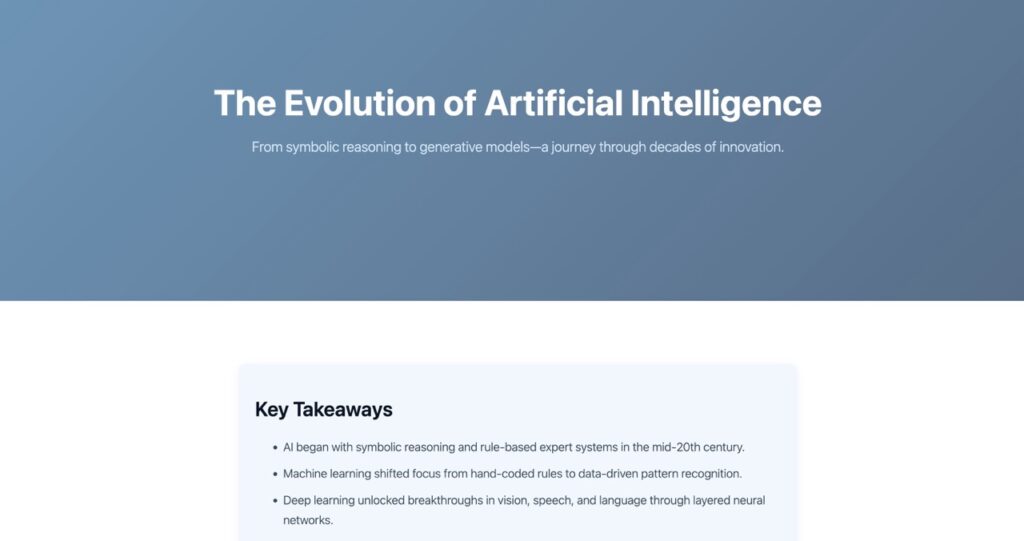
Table of Contents
Use ChatGPT to Write Better AI Builder Prompts
Large Language Models like ChatGPT, Claude, and Gemini excel at understanding context and generating structured instructions. When you use these tools to craft your AI Builder prompts, you get better-organized pages with more relevant content and professional styling.
The key advantage is that ChatGPT can compress complex requirements into concise, effective prompts while maintaining clarity. It can also research current information and incorporate factual data into your prompt, ensuring your generated pages contain accurate, up-to-date content.
Essential Checklist for Your ChatGPT Request
Critical constraint: AI Builder prompts are limited to 2000 characters maximum. Always specify this limit when asking ChatGPT to create your prompt.
- Provide context: Explain your business, target audience, and page purpose
- Define sections: List the main content areas you need (hero, features, testimonials, etc.)
- Specify style: Describe the visual aesthetic (modern, minimal, bold, professional)
- Stay under 2000 characters: Ask ChatGPT to optimize for this limit
- Request research: When building content-heavy pages, ask ChatGPT to include web research and cite sources
Example: Prompt to Give ChatGPT
Here is a copyable example prompt you can give to ChatGPT to generate a blog post about “The Evolution of Artificial Intelligence”.
You are a prompt engineer. Write ONE final prompt (in English) that I can paste into AI Builder (a Gutenberg page generator chatbot) to generate a full Gutenberg blog article page about: “The Evolution of Artificial Intelligence”.
Start by doing online research.
Context:
Your job is only to craft the page-intent prompt: content, structure, tone, and desired visual style/animations/interactions.Requirements for the AI Builder prompt:
- IMPORTANT: The prompt you generate must be under 2,000 characters.
- Generate ONLY the blog article page content (no explanations).
- Style: modern, clean, tech/editorial. Strong typography, generous spacing, subtle accents. Mobile-first.
- Interactions/animations: subtle only (e.g., gentle fade-in on section scroll, hover effects on buttons/cards). Nothing flashy.
- Must include:
- Intro (80–120 words)
- “Key Takeaways” (4–6 bullets)
- Table of Contents with anchor links
- 6–8 H2 sections covering: early history, expert systems, machine learning, deep learning, generative AI, real-world impact, limitations/risks, future outlook
- One short timeline (bulleted or dated list)
- 2–3 pull quotes or callouts
- 1 AI image
- Conclusion with a practical next step
- Final CTA button: “Try AI Builder in WordPress” linking to https://wordpress.org/plugins/ai-builder/
Accuracy:
- Avoid precise stats unless you label them as placeholders like [STAT + SOURCE].
- If you reference key events/models, keep them general unless you add [SOURCE] placeholders.
Output format:
Output ONLY the AI Builder prompt in a single plain text code block.
Page generated with this prompt: https://website-ai-builder.com/the-evolution-of-artificial-intelligence/
Edit What AI Builder Generates (Theme, Blocks, CSS, JavaScript)
AI Builder works with any WordPress theme, giving you complete flexibility. However, we recommend using a theme like Twenty Twenty-Five, which offers strong content editing flexibility and extensive per-block styling options in the Gutenberg editor, making it easier to fine-tune your AI-generated pages without touching code.
Two Ways to Fix Block Styling
If a block’s appearance isn’t quite right, you have two options:
- Edit CSS in the AI Builder chat dialog: Click the chat icon in the top-right corner of your WordPress editor. Make the styling changes you want, and AI Builder will update the CSS for you. This is the fastest method for global style changes.
- Remove the custom class: Select the block, open the Advanced panel in the right sidebar, and delete the class name from “Additional CSS class(es)”. This removes AI Builder’s custom styling and lets your theme’s default styles take over.
For developers: AI Builder also generates JavaScript when needed. You can add or modify this JavaScript through the chat dialog to create custom interactions, animations, or functionality.
The 3 Other AI Builder Content Blocks
Beyond full-page generation, AI Builder offers three specialized blocks for targeted content creation. Each block serves a specific purpose and can be inserted anywhere in your WordPress editor.
AI Block Generation
This block generates complete Gutenberg block structures with custom CSS. It’s perfect for creating complex layouts like pricing tables, feature grids, or testimonial sections without building them manually.
- Best use case: Building structured content sections mid-page, like comparison tables, team member grids, or multi-column feature showcases
AI Image
Insert an AI Image block, then enter your prompt in the “AI Image Generation” panel. AI Builder will create a custom image based on your description, eliminating the need for stock photos or design tools.
- Best use case: Hero backgrounds, product illustrations, blog post featured images, or any visual that needs to match your specific brand style
AI Text
The AI Text block generates written content based on your prompt. It’s ideal for filling in paragraphs, creating product descriptions, or drafting copy when you need quick, contextual text.
- Best use case: Product descriptions, service explanations, FAQ answers, or any paragraph-level content that needs to match your page’s tone and context
Generate with AI Builder
Stop spending hours building WordPress pages from scratch. AI Builder empowers founders and marketers to create professional, conversion-optimized pages in minutes. Install the plugin, describe what you need, and watch your vision come to life with intelligent design and compelling copy.