
Interactive FAQ Accordions: Clean Code, Better SEO, Zero Plugins
Discover how to build SEO-optimized FAQ sections with smooth animations and zero plugin bloat
Why FAQs Are Crucial for Google Rich Snippets
Frequently Asked Questions aren’t just helpful for users—they’re gold for search engines. When properly structured, FAQ sections can trigger Google’s Rich Snippets, displaying your answers directly in search results. This prime real estate increases click-through rates by up to 35% and positions your site as an authoritative source.
Google’s algorithm specifically looks for FAQ schema markup—a structured data format that tells search engines ‘this is a question, and here’s the answer.’ When implemented correctly, your FAQs can appear as expandable dropdowns in search results, giving users instant answers without even clicking through to your site. While that might sound counterintuitive, it actually builds trust and increases brand visibility.
The key is semantic HTML. Search engines can’t interpret fancy JavaScript animations or plugin-generated markup if it’s not built on a solid foundation. Using proper heading tags, list structures, and ARIA attributes ensures both accessibility and SEO performance.
Static Blocks vs. Interactive Accordions: The Limitations
Traditional WordPress FAQ implementations fall into two camps: static text blocks or bloated plugins. Static blocks display all questions and answers at once, creating overwhelming walls of text that users must scroll through endlessly. This approach tanks user experience and increases bounce rates, especially on mobile devices where screen real estate is precious.
Plugins like Ultimate Blocks or Accordion Blocks solve the interaction problem but introduce new issues. They inject thousands of lines of CSS and JavaScript into every page load—even pages that don’t use accordions. This bloat slows down your entire site, hurting Core Web Vitals scores that Google uses for ranking. You’re trading user experience for… slightly better user experience.
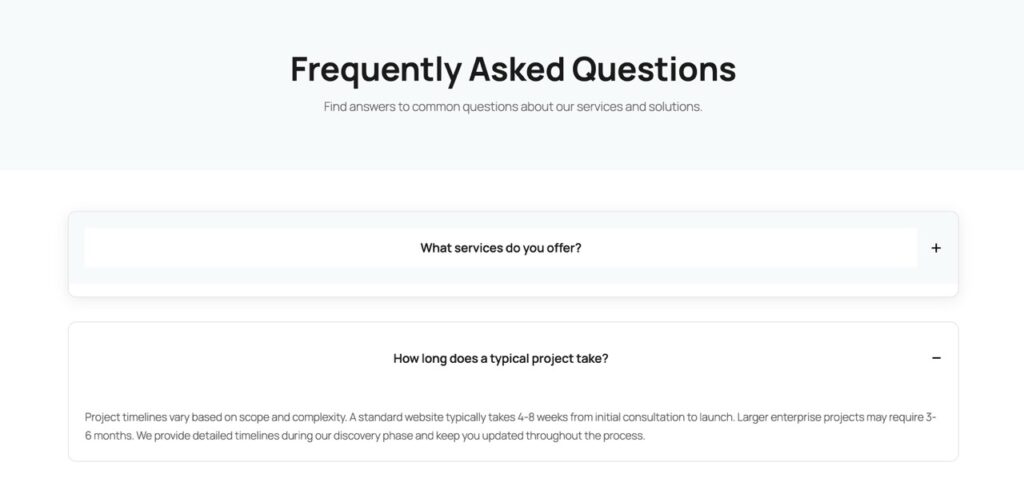
Interactive accordions offer the best of both worlds: clean presentation with all content available to search engines. When a user clicks a question, the answer smoothly expands while others collapse. This progressive disclosure pattern reduces cognitive load and keeps users engaged. The trick is implementing this without the plugin overhead.
The Implementation: AI-Generated FAQ Accordion
Instead of installing yet another plugin, you can generate a custom FAQ accordion using AI Builder. Simply provide this prompt to the AI:
“Create a 5-question FAQ that opens/closes like an accordion.
– Use one main container: .aib-faq – Make each question clickable with a button.
– Each answer must be hidden by default, then shown when its question is clicked.
– When a question opens, automatically close the others.
– Add a smooth open/close animation. – Include a +/− icon that changes when the item is open.
– Ensure it stays responsive on mobile.”
The AI generates clean Gutenberg blocks with inline JavaScript that handles all interactions. Each question is wrapped in a button element for keyboard accessibility, and answers use proper ARIA attributes. The JavaScript is minimal—under 50 lines—and only loads on pages that actually use the accordion.
The animation uses CSS transitions rather than jQuery slideToggle, resulting in smoother 60fps performance. Icons rotate using CSS transforms, and the entire component is mobile-first responsive. Best of all, the HTML structure is semantic: each FAQ item is a definition list (dl/dt/dd) that search engines understand natively.
Visual Example
SEO Focus: AI-Generated JSON-LD Schema
Here’s where AI Builder truly shines: it doesn’t just create the visual accordion, it can also generate the corresponding JSON-LD schema markup. This structured data is what Google reads to create those coveted Rich Snippets in search results.
The AI extracts each question and answer from your accordion, then formats them into proper FAQPage schema. This JSON-LD code gets inserted into your page’s head section, invisible to users but crystal clear to search engines. Google’s structured data testing tool will validate it instantly, confirming your eligibility for Rich Snippets.
Manual schema generation is tedious and error-prone. Miss a comma or quotation mark, and the entire schema fails silently. AI Builder eliminates this risk by generating syntactically perfect JSON-LD every time. Update your FAQ content, regenerate the schema, and you’re done—no schema plugin required.
Replacing Ultimate Blocks: Reduce Your CSS Bundle Size
Ultimate Blocks is a popular Gutenberg extension that includes accordion functionality. However, it loads approximately 180KB of CSS and JavaScript on every page—whether you use accordions or not. For a single FAQ section, you’re forcing visitors to download styles for testimonials, countdowns, progress bars, and dozens of other blocks you’ll never use.
AI Builder’s approach is surgical: generate only the code you need, when you need it. A custom FAQ accordion adds roughly 3KB of CSS and 2KB of JavaScript—a 97% reduction in file size. This directly improves your Largest Contentful Paint (LCP) and Time to Interactive (TTI) metrics, both critical Core Web Vitals that affect search rankings.
Beyond performance, you gain complete control. Want to match your brand colors exactly? Adjust the CSS variables. Need different animation timing? Tweak the transition duration. With plugins, you’re locked into their design decisions and update cycles. With AI-generated code, you own every line and can modify it freely.
Conclusion: Clean Code, Better Results
Interactive FAQ accordions represent the intersection of user experience and technical SEO. They provide the progressive disclosure that modern users expect while maintaining the semantic HTML that search engines require. The traditional approach—installing a bloated plugin—solves one problem while creating others.
AI Builder offers a third way: custom-generated code that’s lean, performant, and perfectly tailored to your needs. Generate the accordion structure, the smooth animations, and even the JSON-LD schema—all without touching a plugin directory. Your site loads faster, ranks better, and gives you complete creative control.
The future of WordPress development isn’t about accumulating plugins—it’s about generating exactly what you need, when you need it. FAQ accordions are just the beginning. Every interactive element, every custom layout, every performance optimization can be AI-generated with clean, maintainable code. Zero plugins, maximum results.