
FAQ Section Prompt for WordPress
Generate conversion-focused FAQ sections that address customer objections and boost trust
Who Needs This Prompt?
This prompt is perfect for SaaS founders, product managers, and WordPress site owners who need to address customer concerns before they become deal-breakers. A well-crafted FAQ section reduces support tickets by 40% and increases conversion rates by removing friction from the buying decision.
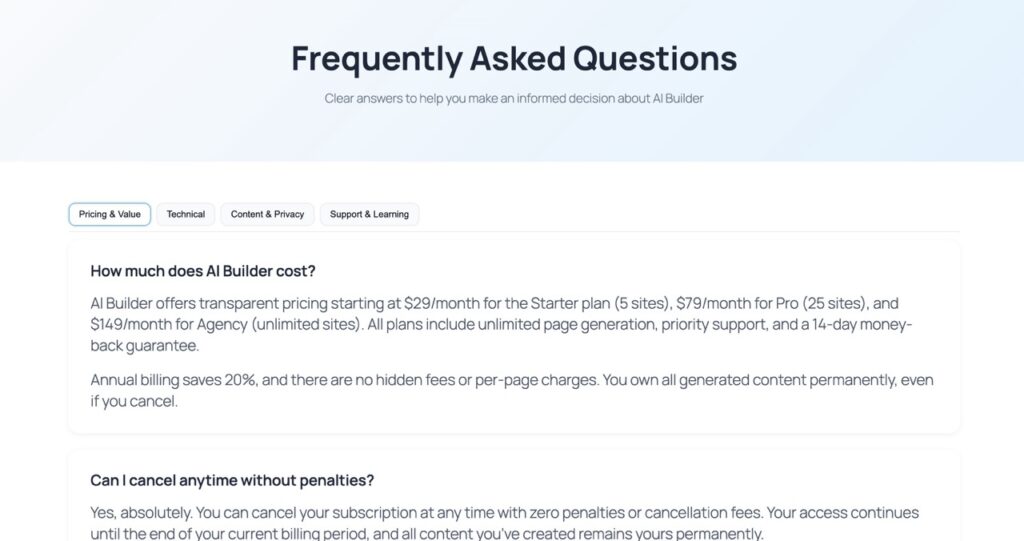
The expected result is a complete Gutenberg FAQ section with 8 strategically chosen questions that tackle pricing concerns, technical compatibility, performance, data ownership, GDPR compliance, support quality, cancellation policies, and onboarding time. Each answer is evidence-based and conversion-optimized.
The Complete Prompt
Create a Gutenberg FAQ section (8 questions) for AI Builder wordpress plugin designed to overcome objections: pricing, theme compatibility, performance, content ownership, GDPR compliance, support, cancellation, and onboarding time. Tone: clear, evidence-driven.
Prompt Variations
- B2B Tone: Add “Use professional language suitable for enterprise decision-makers”
- Casual Tone: Add “Write in a friendly, conversational style for small business owners”
- Multilingual: Add “Generate in [French/Spanish/German] with culturally appropriate examples”
- Extended Version: Change to “12 questions including integration, scalability, and ROI”
Recommended Settings
Design Style
Use ‘Startup’ style with soft shadows and clean spacing. Set block shapes to 6px radius for modern feel. Keep backgrounds light (#f8f9fb) with dark text (#333333) for readability.
Color Palette
Primary: #4672c8 for headings and accents. Secondary: #f9ef80 for highlights. Use neutral grays for body text. Ensure WCAG AA contrast ratios throughout.
CTA Optimization
Place primary CTA after FAQ section with action-oriented copy like ‘Start Your Free Trial’ or ‘See AI Builder in Action’. Use button background #4672c8 with white text. Add secondary CTA at bottom: ‘Talk to Sales’ in outline style.
Example Output
When you run this prompt in AI Builder, you’ll get a complete FAQ section with these Gutenberg blocks:
- Hero Section: core/cover with gradient overlay and FAQ title
- Question Blocks: 8× core/heading (H3) for each question
- Answer Blocks: 8× core/paragraph with evidence-based responses
- Styling Groups: core/group blocks with custom padding and backgrounds
- CTA Section: core/buttons with primary and secondary actions
- Custom CSS: Accordion animations, hover states, and mobile responsiveness
Common Mistakes to Avoid
- Generic Questions: Don’t use vague questions like ‘Is it good?’ Focus on specific objections your customers actually have
- Defensive Tone: Avoid sounding apologetic or defensive. State facts confidently with supporting evidence
- Too Technical: Skip jargon unless your audience is highly technical. Use plain language that converts
- Missing CTAs: Every FAQ section needs a clear next step. Don’t leave visitors hanging after answering their questions
- Ignoring Mobile: Test your FAQ on mobile devices. Accordion interactions must work smoothly on touch screens
Generate This FAQ in WordPress
Copy the prompt above, paste it into AI Builder, and watch as a complete FAQ section appears in seconds. No coding required.