
Pricing Section Prompt – Build a Complete SaaS Pricing Page
Generate a professional 3-tier pricing table with AI Builder in seconds. Perfect for SaaS founders, agencies, and product teams who need conversion-optimized pricing pages without coding.
Why Use This Pricing Prompt?
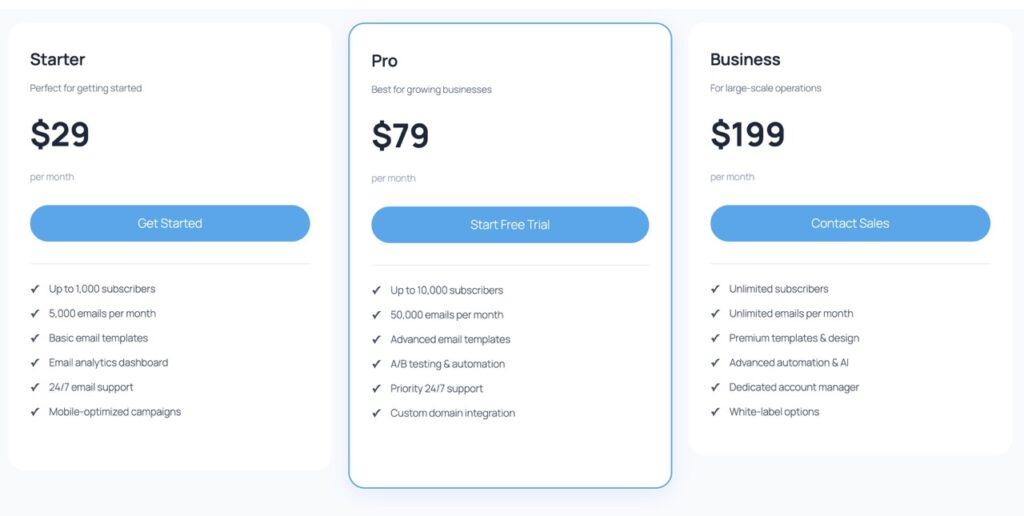
This prompt generates a complete pricing section with three plans (Starter, Pro, Business), monthly/annual toggle, feature comparisons, and a built-in FAQ. It’s designed for SaaS products, digital services, or subscription businesses that need a high-converting pricing page fast. The AI handles layout, copywriting, and mobile responsiveness automatically.
The Prompt (Copy & Paste)
Base Prompt:
Create a Gutenberg PRICING section with 3 plans: Starter, Pro (recommended), Business. Product: {product}. Include: monthly + yearly pricing, 6 features per plan, a “Most Popular” badge, a pricing FAQ (4 questions), and a CTA per plan. Add reassurance microcopy (cancellation, support). Style: responsive table layout, mobile-readable.
Prompt Variations
- B2B SaaS: Add ‘Enterprise’ plan with custom pricing + ‘Contact Sales’ CTA
- Freelancer tone: Replace ‘Business’ with ‘Agency’, add testimonial quotes in features
- French version: Replace prompt with ‘Crée une section TARIFS…’
- Annual-only: Remove monthly toggle, add ‘2 months free’ badge on annual prices
Recommended Settings
Design Style
Choose ‘Startup’ for soft shadows and gradients. Use 6px border radius for modern cards. Enable hover effects on pricing cards for better engagement.
Colors & CTAs
Use your primary color (#4672c8) for ‘Most Popular’ badge. Set CTA buttons to secondary color (#f9ef80) with dark text for contrast. Add trust badges below pricing.
What You’ll Get
AI Builder generates a complete pricing section with these Gutenberg blocks:
- 3 Pricing Cards (core/columns + core/group) with monthly/annual toggle
- Feature Lists (core/list) with checkmarks, 6 items per plan
- ‘Most Popular’ Badge (core/paragraph with custom styling)
- CTA Buttons (core/button) per plan with hover states
- FAQ Section (ai-builder/aibui-tabs) with 4 common pricing questions
- Trust Microcopy (core/paragraph) for cancellation policy and support
Common Mistakes to Avoid
- Too many features: Stick to 6 per plan. More = decision paralysis.
- Missing annual discount: Always show savings (e.g., ‘2 months free’) to push annual.
- Weak CTAs: Use action verbs (‘Start Free Trial’, not ‘Select Plan’).
- No social proof: Add trust badges or testimonials near pricing.
- Ignoring mobile: Test on 375px width—cards should stack cleanly.
Ready to Build Your Pricing Page?
Generate this pricing template in WordPress with AI Builder. No coding required—just paste the prompt and customize.