
The E-commerce Development Challenge
E-commerce is booming. Yet building a professional WooCommerce store remains technically challenging for many business owners. Traditional development requires coding knowledge, design expertise, and hours of manual product entry.
WordPress AI Builder changes this paradigm entirely. This plugin brings artificial intelligence directly into your WordPress dashboard, enabling you to create complete WooCommerce pages, manage products, and generate optimized content through simple conversational prompts. No coding required, no design skills needed—just describe what you want, and AI Builder makes it happen.
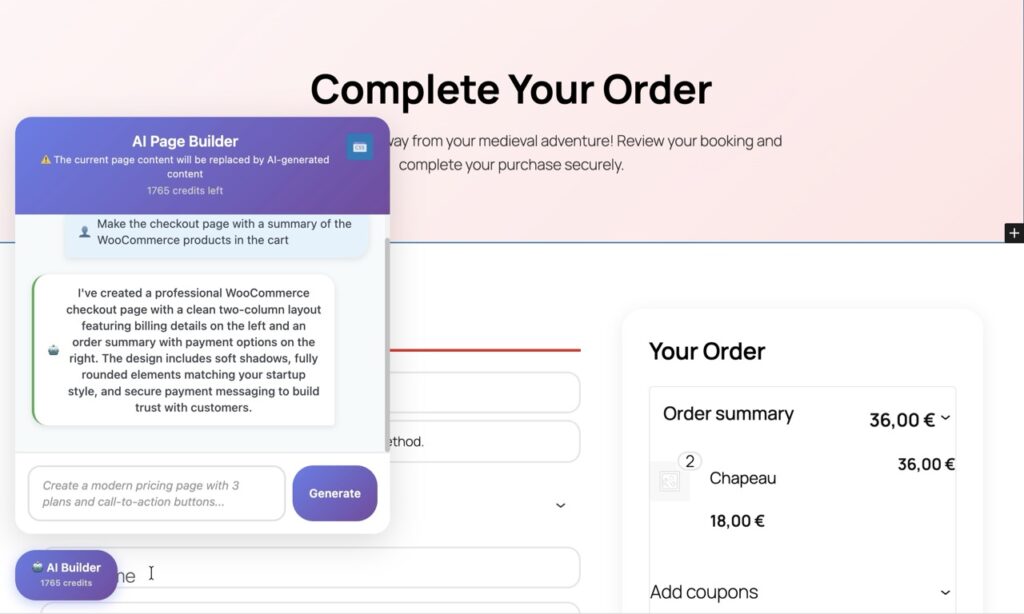
Creating WooCommerce Pages with AI
AI Builder’s chat widget integrates seamlessly with Gutenberg, WordPress’s native block editor. Simply open the AI assistant, describe the page you need, and watch as it generates professional layouts using native WooCommerce blocks.
The system automatically selects appropriate WooCommerce blocks based on your requirements. Need a product category page? AI Builder generates layouts with product grids, filters, and sorting options. Creating individual product pages? It adds image galleries, price displays, add-to-cart buttons, and related product sections—all using WooCommerce’s native functionality.
For example, prompt “Create a product category page for summer clothing with filters and a promotional banner” and AI Builder delivers a complete page structure. Or request “Design a product page template with image zoom, customer reviews, and size chart” to get a professional layout ready for customization. Every element remains fully editable in Gutenberg, giving you complete control over the final result.
Managing Products with Site Copilot
Beyond page creation, AI Builder’s Site Copilot feature transforms product management through WooCommerce’s REST API. This powerful capability lets you create, update, and manage products using natural language commands—no manual data entry required.
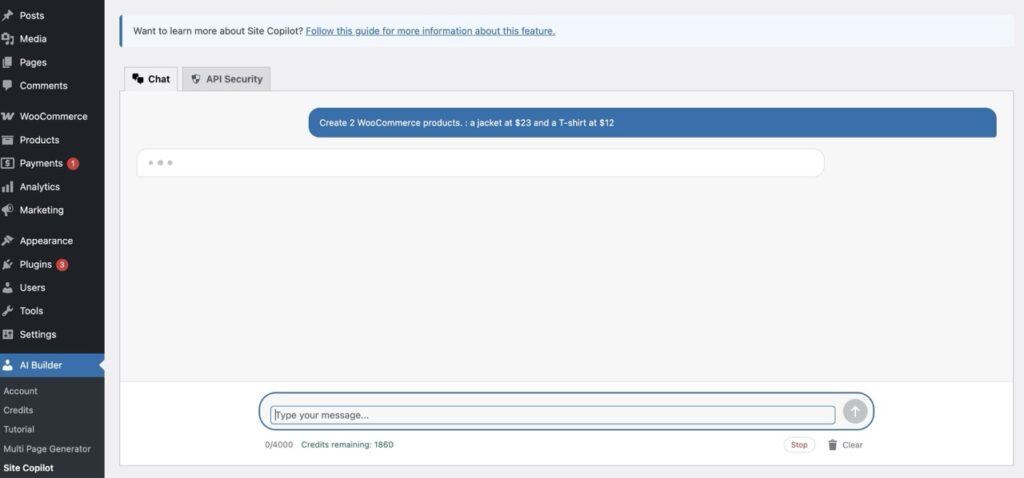
Configuration is straightforward through AI Builder’s API Security settings. Navigate to the plugin settings and enable the WooCommerce endpoints you need. For product management, enable GET and POST methods for the /wc/v2/products route. This grants Site Copilot permission to read existing products and create new ones while maintaining security through WordPress’s authentication system.
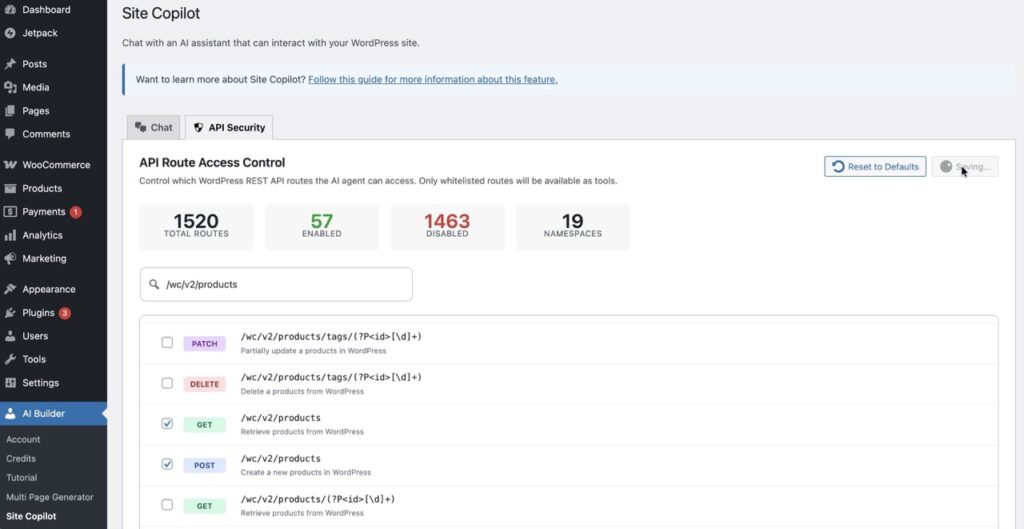
Once configured, product management becomes conversational. Tell Site Copilot “Create a new product called Premium Yoga Mat priced at $49.99 with description and categories” and it executes the API call automatically. Need to update inventory? Simply say “Set stock quantity to 50 for product ID 123.” Want to list products? Ask “Show me all products in the Fitness category.”
The system handles complex operations seamlessly. Bulk updates, category assignments, price changes, and inventory management all work through natural conversation. Site Copilot translates your requests into proper API calls, executes them, and confirms the results. This dramatically reduces the time spent on routine product management tasks, letting you focus on strategy and growth.
Advanced AI Features for E-commerce
SEO optimization happens automatically. AI Builder generates keyword-rich product descriptions, meta titles, and category content optimized for search engines. It understands e-commerce best practices, incorporating persuasive copywriting techniques that convert browsers into buyers. Every description balances SEO requirements with compelling sales copy.
Category pages benefit from AI-generated introductory content that improves SEO while guiding customers. The system creates engaging category descriptions, buying guides, and feature comparisons—all tailored to your specific products and target audience.
Best Practices for AI-Powered WooCommerce
Maximize AI Builder’s effectiveness with clear, specific prompts. Instead of “create a product page,” try “create a product page for wireless headphones with image gallery, technical specifications table, and customer review section.” Detailed requests yield better results.
Security matters. Only enable API routes you actively use, and regularly review permissions in API Security settings. This protects your store while maintaining functionality. Follow the principle of least privilege—grant only necessary access.
Establish a workflow: use AI Builder for initial page creation and bulk product setup, then refine manually in Gutenberg. This combines AI speed with human creativity. Review AI-generated content before publishing, ensuring it matches your brand voice and accuracy standards. The AI provides the foundation; you add the finishing touches that make your store unique.
Transform Your E-commerce Development Today
WordPress AI Builder revolutionizes WooCommerce development by combining intelligent page generation, conversational product management, and automated content creation. What once required hours of technical work now happens through simple conversations. Build professional stores faster, manage products effortlessly, and focus on growing your business instead of wrestling with technology.
Ready to experience the future of e-commerce development? Download AI Builder from the WordPress plugin directory and start building smarter today. Your next WooCommerce store is just a conversation away.
Additional Resources
- AI Builder Official Website – Learn more about features and capabilities
- AI Builder features – Comprehensive plugin overview
- WooCommerce Documentation – Official WooCommerce block reference
- WordPress REST API – Technical API documentation